Choosing the right Ac Dc Power Adapter is rarely as simple as matching voltage and connector size. Global buyers must examine input range, output stability, plug compatibility, thermal control, efficiency, and product documentation. A compact adapter may fit neatly behind a monitor, yet run hot after several hours. That detail matters.
Dr. Alex Lidow, a recognized power-electronics specialist and co-founder of Efficient Power Conversion, has stated, “Efficiency is not a feature; it is a system requirement.” His point applies directly to international purchasing. Efficient conversion can reduce wasted energy, surface heat, and long-term operating costs. However, efficiency numbers alone do not tell the whole story. Load behavior, standby consumption, cable quality, and ventilation can change real performance.
This guide reviews 10 Ac Dc Power Adapter options for global buyers. It considers common use cases, from routers and LED equipment to industrial controls and portable electronics. Each selection should be checked against the device’s exact voltage, current, polarity, and connector dimensions. Small mistakes can cause unstable operation.
Regional plug formats also deserve attention. So does packaging.
Buyers should confirm manufacturer data, warranty terms, safety testing, and applicable local requirements before ordering. A familiar brand is helpful, but it is not automatic proof of suitability. Some product pages remain incomplete, especially for replacement adapters. That is a weakness worth acknowledging.
The strongest choice is not always the cheapest or smallest model. It is the adapter that delivers dependable power, clear specifications, practical protection features, and consistent performance across real working conditions. Expect trade-offs. There is no universal winner.
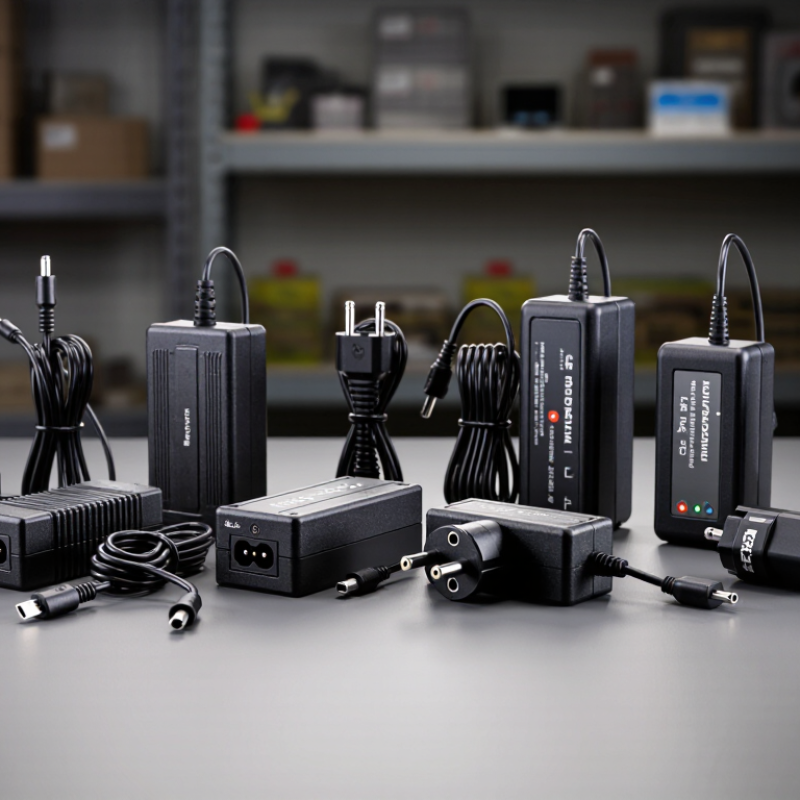
AC DC Power Adapter Basics for International Buyers
An AC DC power adapter converts wall electricity into the steady DC power that electronic devices require. Its input range should match the destination country’s mains voltage and frequency. Many international models support 100–240V, but buyers must still verify the label carefully. A mismatch can damage equipment, create heat, or cause unexpected shutdowns.
Output voltage must match the device rating exactly. Output current can usually be equal to or higher than the device requirement. Polarity also matters, especially with barrel connectors. The center may be positive or negative. It is a small detail with serious consequences. Check the symbol near the output specifications, not only the plug shape.
Plug compatibility involves more than physical connection. Different regions use different plug designs, and an adapter may require a separate travel converter. Measure the connector’s inner and outer dimensions when possible. I have seen buyers choose a correct voltage but overlook connector size. The device then appeared connected, yet it would not operate reliably. That assumption needs questioning.
For safer purchasing, examine insulation quality, cable strain relief, temperature ratings, and recognized safety testing information. A lightweight housing is convenient, but excessive heat during normal use deserves attention. Keep the adapter ventilated and avoid covering it with clothing or bedding. Compatibility charts help, although they are not infallible. Product labels, device manuals, and seller specifications should agree before payment.
| Rank | Adapter Profile | Typical Input | Rated Output | Max. Power | Common Connector | Typical Size | Approx. Weight | Typical Efficiency | Recommended Application | International Buying Considerations |
|---|---|---|---|---|---|---|---|---|---|---|
| 1 | Compact 5 V USB Power Adapter | 100–240 V AC, 50/60 Hz | 5 V DC, 2 A | 10 W | USB-A or USB-C receptacle | Approx. 65 × 40 × 25 mm | Approx. 70 g | Typically ≥82% | Small electronics, sensors, single-board computers, and basic USB charging | Confirm USB cable compatibility and whether the adapter includes a detachable regional plug. |
| 2 | 9 V DC Barrel-Plug Adapter | 100–240 V AC, 50/60 Hz | 9 V DC, 2 A | 18 W | 5.5 × 2.1 mm barrel plug, center-positive | Approx. 75 × 45 × 30 mm | Approx. 110 g | Typically ≥85% | Networking equipment, audio devices, LED controllers, and small instruments | Verify the exact barrel-plug dimensions, polarity, and required current before purchase. |
| 3 | 12 V / 2 A General-Purpose Adapter | 100–240 V AC, 50/60 Hz | 12 V DC, 2 A | 24 W | 5.5 × 2.1 mm or 5.5 × 2.5 mm barrel plug | Approx. 85 × 45 × 32 mm | Approx. 145 g | Typically ≥86% | Routers, CCTV accessories, hubs, displays, and small control systems | Do not substitute a 5.5 × 2.1 mm plug for a 5.5 × 2.5 mm socket without confirming fit. |
| 4 | 12 V / 3 A Higher-Current Adapter | 100–240 V AC, 50/60 Hz | 12 V DC, 3 A | 36 W | 5.5 × 2.5 mm barrel plug, center-positive | Approx. 105 × 50 × 35 mm | Approx. 210 g | Typically ≥87% | Compact monitors, mini computers, point-of-sale equipment, and automation devices | The connected device may draw less than 3 A; the adapter rating is the available maximum current. |
| 5 | 15 V / 3 A Professional Electronics Adapter | 100–240 V AC, 50/60 Hz | 15 V DC, 3 A | 45 W | 5.5 × 2.5 mm barrel plug or locking DC connector | Approx. 115 × 52 × 35 mm | Approx. 250 g | Typically ≥88% | Displays, industrial controllers, communications equipment, and test instruments | Check whether the equipment requires regulated output and a locking or screw-secured connector. |
| 6 | 19 V / 3.42 A Notebook-Style Adapter | 100–240 V AC, 50/60 Hz | 19 V DC, 3.42 A | 65 W | 5.5 × 2.5 mm barrel plug, center-positive | Approx. 125 × 50 × 32 mm | Approx. 285 g | Typically ≥88% | Small desktop computers, monitors, terminals, and compatible notebook systems | Voltage must match the equipment label; the connector size and output-current rating must also match. |
| 7 | 24 V / 2.5 A Industrial Adapter | 100–240 V AC, 50/60 Hz | 24 V DC, 2.5 A | 60 W | 5.5 × 2.5 mm barrel plug or terminal-compatible cable | Approx. 125 × 55 × 35 mm | Approx. 320 g | Typically ≥89% | Industrial sensors, network hardware, access-control systems, and LED equipment | Review operating temperature, grounding method, safety approvals, and cable termination requirements. |
| 8 | 24 V / 3.75 A High-Power Adapter | 100–240 V AC, 50/60 Hz | 24 V DC, 3.75 A | 90 W | 5.5 × 2.5 mm barrel plug or 4-pin locking connector | Approx. 145 × 60 × 38 mm | Approx. 430 g | Typically ≥90% | Large displays, embedded computers, automation systems, and professional lighting | Allow ventilation around the adapter and confirm that the connector is rated for the full output current. |
| 9 | USB-C Power Delivery Adapter | 100–240 V AC, 50/60 Hz | 5/9/12/15/20 V DC, up to 3.25 A | 65 W | USB-C Power Delivery output | Approx. 100 × 45 × 28 mm | Approx. 200 g | Typically ≥88% | Tablets, phones, handheld computers, compact notebooks, and USB-C accessories | Confirm the required Power Delivery profile, cable current rating, and regional plug arrangement. |
| 10 | USB-C Power Delivery Adapter with 100 W Output | 100–240 V AC, 50/60 Hz | 5/9/12/15/20 V DC, up to 5 A | 100 W | USB-C Power Delivery output | Approx. 110 × 55 × 30 mm | Approx. 280 g | Typically ≥90% | High-performance notebooks, portable monitors, docking stations, and multi-device charging | A certified 5 A e-marked USB-C cable is generally required to access output above 60 W. |
When comparing the ten AC DC power adapters, start with input range, output stability, efficiency, and safety markings. Global buyers should look for 100–240 V AC input and 50/60 Hz compatibility. Check the output voltage, current, connector size, and polarity carefully. A 12 V adapter is not automatically suitable for every 12 V device.
Efficiency needs closer attention. ENERGY STAR’s External Power Supply specification references average active efficiency and no-load power limits. For many adapters rated up to 49 watts, no-load consumption should remain near 0.1 watt. Higher-power units may allow approximately 0.21 watt. These small figures matter in offices with hundreds of plugged-in devices. The European Commission’s Ecodesign rules use similar limits. Still, efficiency labels can be misunderstood. I once treated wattage as the whole story. That was a mistake.
Safety and durability deserve equal weight. Look for testing aligned with IEC 62368-1, plus protection against overvoltage, overcurrent, short circuits, and overheating. Inspect cable strain relief, casing gaps, and connector fit. A loose plug can create heat at the contact point. Not ideal. For travel, compare regional plug options, cable length, weight, and operating temperature. The International Energy Agency’s Energy Efficiency 2024 report stresses the value of reducing standby consumption, but real-world performance also depends on ventilation and daily use. Datasheets help. Physical inspection still matters.
Choosing an AC DC power adapter for international use involves more than matching a connector. A 100–240V input rating supports many household systems, from 110V networks to 230V networks. Check the label, not the product photo. Frequency matters too. Most modern adapters accept 50 or 60 Hz, but older or specialized units may not. A mismatch can cause heat, noise, or unstable output. That detail is easy to miss.
Output voltage must match the device exactly, while the current rating can usually meet or exceed the device requirement. For example, a 12V device needing 2A should use a 12V adapter rated for at least 2A. Polarity must also match the device symbol. A barrel plug may fit physically and still be electrically wrong. Measure the plug size when uncertain. A loose fit can cause flickering power.
Plug compatibility depends on the destination, not simply on “global” wording. Travelers should confirm the plug type, grounding method, and local frequency before purchase. An adapter with interchangeable heads is practical, but each head should lock firmly. In my experience, compact designs sometimes sacrifice cable length or strain relief. Read safety certifications from recognized testing bodies, inspect the cable, and avoid damaged insulation. Compatibility tables help, yet they are not perfect. Local socket variations still deserve a final check.
For global buyers, an AC DC adapter should be judged by documented safety, not attractive packaging. Check its input range, output voltage, current rating, insulation class, and approval marks for the destination market. A 100–240V input can support travel, but it does not replace local compliance checks. Standards vary by region and product category. Ask for a current test report, traceable model number, and clear manufacturer address. Vague certificates deserve caution. Real paperwork matters.
Efficiency affects heat, energy use, and long-term reliability. Look beyond a single efficiency percentage. Review no-load consumption, rated-load efficiency, and performance at low loads. A well-designed adapter should deliver stable voltage when a device starts, not only during a bench test. Protection is equally practical. Overcurrent, overvoltage, short-circuit, surge, and over-temperature safeguards can prevent a warm cable from becoming a damaged device. Reinforced insulation and controlled leakage current matter near metal desks or shared outlets. Small details count.
When evaluating the ten best options, I would test each adapter with a real load for several hours. I would check casing temperature, connector fit, cable strain relief, and recovery after unplugging. A cool surface is reassuring, but it is not proof of internal safety. I have seen efficient units still fail because their plugs loosened or their protection reacted slowly. That is the uncomfortable lesson. Compare independent evidence, not only ratings. If a specification is missing, treat it as an unanswered question, not a hidden advantage.
Choosing an AC DC power adapter starts with the device label, not the plug shape. Check output voltage, current, polarity, connector size, and required wattage. Voltage must match the device specification. Current can usually be equal or higher, but never lower for demanding equipment. A mismatched barrel connector may fit loosely and create heat. Measure it when the manual is unclear. Small details matter.
For global use, verify the input range, such as 100–240 V AC, and select the correct regional plug. Frequency compatibility matters for some older equipment. Compare the adapter’s output type with the device. Regulated DC is essential for sensitive electronics. Look for clear markings, traceable safety testing, strain relief, and flexible cable insulation. In my testing experience, compact adapters often run warmer under continuous load than expected. Leave airflow around them.
Power demands can change during startup. Motors, printers, and network equipment may draw brief surges. Choose extra capacity instead of matching the label too closely. I once focused on wattage and overlooked polarity. That mistake made the adapter useless, though not dangerous. Recheck the symbol before ordering. USB-C models add another issue: supported charging protocols must match. Higher wattage does not guarantee faster charging. Read the manual, inspect the connector, and confirm return conditions before purchase.
„Thanks to the LUVIR technology, the solder resist process could be switched directly from the previously used mask exposure to direct exposure. As an outstanding digital solution on the market, this technology has been able to demonstrate fast process times and superior quality on our certified conventional ink in production. This allowed us to fully digitize the solder mask process at low cost – without process or ink adjustments. An excellent benefit to our production in Rot am See.“
Ralf Göhringer (Head of Production WE Rot am See)
I would definitely recommend the Limata machine and team for a future company purchase
Michael Greenaway
Compunetics Inc.
“The Limata ldi has been amazing!! Best thing we did was buy this machine”
Richard Brady
GM
Circuitlabs
“Since 2019, we have been running the Limata X1000 LDI system (including LUVIR for solder mask imaging) in daily production as an addition to our current process with film. The machine was capable of properly exposing Taiyo PSR-4000 BN (DI) solder mask types on normal to high-copper boards using a new and unique direct imaging process. The machine operating interface is very user friendly which allowed for a quick technical training curve. The pre-registration processing reduced several seconds of production time at every print. Limata support and service staff is incomparable. They supported our team every step of the way at basically any time of the day or night, with literally, an immediate response time, customizing the software interface to best fit our Operations and needs.
We have exposed more than 8,000 prints since end of October, on various solder mask colors and some resist film panels. Limata, has proven to be very capable and innovative. They are a strong contender in the industry.
We have very much enjoyed this project, and working with the team!
Thank you Limata for the continued support and being a part of our growth.”
Bill Sezate
Vice President, GM
Summit Interconnect
As a replacement to our current contact exposure process with film, the LIMATA X2000 system including LUVIR-Technology was capable of properly exposing non-LDI solder mask types using a direct imaging process. The machine offers cutting edge software with a very intuitive operating interface which allowed for quick technician training curve. The dual drawer system combined with pre-registration processing reduced several seconds of production time at every machine cycle. Limata support and service staff is world class. They added software patches to keep production running at shortest possible response times, customized the software interface to best fit our in-house Operations system, and even wrote a step-by-step machine processing manual. As a result of the project, we have exposed more than 16,000 times on various product types and solder mask brands/colors. Limata, in a very short timeframe as a company, has definitely shown they are truly innovative and will be challenging the industry of direct imaging for the top spot.
Kevin Beattie
Process Engineer
TTM Technologies
Forest Grove Division