Choosing a reliable Document Camera manufacturer in China takes more than comparing catalog prices. Buyers should look closely at image quality, focusing performance, lighting, and how clearly small text appears on screen. A useful camera should capture worksheets, books, and three-dimensional objects without constant adjustment. Ask suppliers for sample footage under realistic classroom or meeting-room conditions. A bright showroom image may not tell the whole story.
This guide examines manufacturers through practical purchasing criteria, including product range, customization options, production consistency, communication, and after-sales support. Buyers can also compare resolution, frame rates, connection types, software compatibility, and warranty terms. Details matter. Request written specifications and confirm which accessories, such as cables or document mats, come with each model. If a supplier offers a factory audit or sample inspection, clarify what that process covers. Still, no checklist can guarantee a perfect order. Needs vary by budget, teaching setup, and intended use, and some product descriptions leave important questions unanswered. That deserves attention.
The manufacturers discussed here are starting points for informed evaluation, not automatic endorsements. Compare responses carefully, test samples where practical, and confirm lead times before placing an order. A little extra scrutiny can prevent an impressive specification sheet from becoming a disappointing classroom experience.
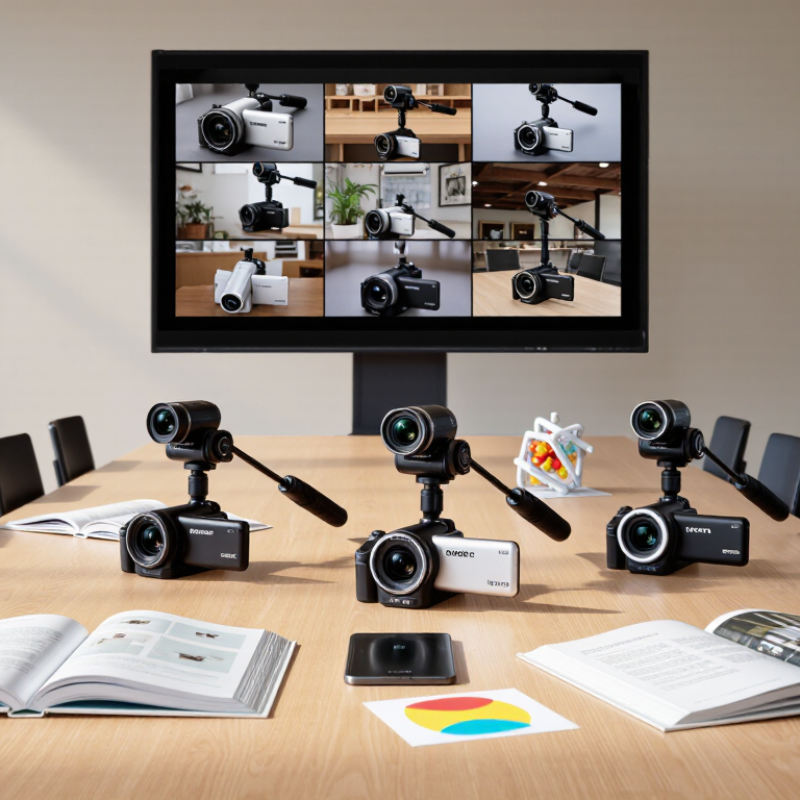
A document camera captures printed pages, objects, or handwritten work and displays them on a larger screen. It usually combines a camera head, adjustable arm, light source, and connection to a computer or display. In a classroom, a teacher can place a small leaf under the lens and enlarge its veins for everyone to inspect. A repair technician might show a tiny component while explaining each step. Simple, but useful.
The main applications include teaching, training, meetings, and close-up demonstrations. Teachers use document cameras to share textbook passages, solve equations live, or compare student work without making copies. In offices, they can present paper forms and annotated diagrams during remote meetings. Museums and libraries may use them to show fragile or detailed materials, though careful lighting and handling matter. A camera cannot replace a clear explanation.
For buyers, the intended workspace should guide the choice. A wide classroom may need stronger zoom and flexible positioning; a small desk may benefit more from a compact base. Check image clarity, focus speed, lighting control, and compatibility with existing screens before comparing specifications. Test a glossy page and a handwritten note if possible. Reflections can be annoying. Published resolution alone does not show how readable fine print will look in a real room.
Evaluate image performance, not brochure claims. Ask for native resolution, frame rate, autofocus behavior, and color accuracy under classroom lighting. Test glossy pages, small text, and a moving hand. Check edge sharpness and exposure changes. Small details matter.
UNESCO’s 2023 Global Education Monitoring Report notes that education technology products change every 36 months on average. That short cycle makes firmware support and spare-part availability practical buying criteria. Ask how long security and compatibility updates are planned, and request a written support schedule. Also confirm that sample units match the hardware and software configuration offered for production.
Assess factory controls with specific evidence. Request inspection records, defect-rate calculations with dates and sample sizes, and calibration procedures for each production line. Ask how the manufacturer handles lens dust, loose hinges, and inconsistent USB connections. A live factory video can help, but it is not a substitute for an independent audit or batch inspection. I would remain cautious: one polished demo unit says little about consistency across hundreds of units. This checklist has limits; it cannot predict every field failure.
This chart presents a suggested 100-point evaluation framework, not measured manufacturer scores or market research. Buyers can adjust the weights to match their needs. Assess image quality, device and software compatibility, product reliability, after-sales support, and applicable compliance documentation when comparing suppliers.
Chinese document camera manufacturers differ less by headline resolution than by engineering depth, production control, and service reach. Some focus on compact USB models for classrooms; others build 4K units with HDMI output, autofocus, and annotation software. Ask how steadily a camera holds focus on a glossy page or a small circuit board. Small details matter. Compare sample footage, not just specification sheets, and check whether replacement cables and spare parts are available.
Product range often signals a manufacturer’s market focus. Lightweight foldable models suit mobile teaching and small training rooms, while larger units with flexible arms and multiple outputs fit lecture halls or document-heavy offices. For each sample, test text clarity at the edges, motion blur when turning a page, and image stability under ordinary ceiling lights. Request written data on sensor resolution, frame rate, warranty terms, and software updates. A high resolution figure alone can mislead.
Software deserves equal scrutiny. UNESCO’s 2023 Global Education Monitoring Report found that only 16% of countries explicitly guarantee data privacy in education by law. Ask how companion software handles captured images, whether accounts are required, and whether updates remain available after purchase. This does not prove a camera is unsafe; it highlights questions buyers should verify. Supplier answers can be vague, so record them and test the unit before approving a bulk order.
When comparing document camera manufacturers in China, judge the sample unit, not just the catalog. Test it with a printed page, a glossy photo, and handwriting under ordinary room lights. Check focus speed, edge sharpness, color consistency, and whether the image stays steady when the arm moves. Ask for both sensor resolution and effective output resolution; they are not always the same. Review sample inspection records and the quality-control steps used before shipment. A polished demo is useful, but it cannot replace a repeatable test. Small details matter.
Certifications should match the exact model and destination market. Request current documents, then verify model numbers, issuing bodies, and validity dates instead of accepting a generic logo sheet. Compare pricing line by line: camera, software, cables, packaging, spare parts, and warranty coverage. A low quote may exclude setup help or replacement parts. Clarify response times, repair routes, firmware updates, and who pays shipping for a faulty unit. Ask support staff to troubleshoot a sample issue before placing a large order. This reveals how clearly they explain technical steps. Not every supplier will answer perfectly. Record gaps, agree on written service terms, and leave room for another evaluation; buyers can miss things too. That is worth admitting.
Anonymous supplier-profile comparison for initial sourcing research. Specifications, certifications, prices, and service terms vary by model and supplier; confirm them against the exact product and written quotation.
| Supplier profile | Typical product range | Quality checks to request | Certifications and compliance | Indicative FOB price* | Support and best fit |
|---|---|---|---|---|---|
| Entry-level OEM supplier | USB document cameras, commonly 5–8 MP; fixed-focus options and basic LED lighting. | Check image sharpness across the full capture area, autofocus behavior if included, USB compatibility, and sample-to-production consistency. | Request model-specific test reports and applicable market documents. CE, FCC, or RoHS claims should be verified for the exact model and destination market. | About US$25–80 per unit, depending on optics, controls, order quantity, and packaging. | Often suited to cost-sensitive classroom or basic office use. Confirm software, warranty duration, spare-part availability, and response times before ordering. |
| Mid-range education-focused supplier | Typically 8–13 MP models with autofocus, a flexible camera arm, built-in lighting, and image capture or annotation software. | Evaluate autofocus speed, color accuracy, arm stability, heat management, and performance with both printed text and three-dimensional objects. | Ask for applicable EMC and electrical-safety documentation for the intended sales region. An ISO 9001 certificate, if provided, applies to the certified organization and scope, not automatically to product performance. | About US$60–180 per unit; software, output interfaces, and order volume affect pricing. | A practical shortlist for schools and training rooms. Confirm operating-system support, software update policy, and availability of English-language manuals. |
| Advanced 4K or hybrid-interface supplier | Higher-resolution models, often marketed as 4K, with combinations of USB, HDMI, or wireless functions depending on the model. | Verify native sensor resolution and actual video output, frame rate, focus performance, interface behavior, and whether key functions work without proprietary software. | Request test reports and declarations for the exact configuration, including any wireless module. Confirm regional radio requirements where wireless connectivity is included. | About US$150–500+ per unit, depending on resolution, interfaces, bundled software, and customization. | Better suited to lecture capture, hybrid teaching, or detailed demonstrations. Ask about firmware updates, integration support, and replacement-unit lead times. |
| Custom-project and private-label supplier | Configuration may include customized housing, logo, packaging, cable, software language, or interface selection; specifications depend on the project. | Agree on a signed sample, bill of materials, acceptance criteria, inspection plan, and change-control process before mass production. | Clarify who is responsible for testing, labeling, technical files, and market-specific compliance costs. Do not assume a certificate covers a modified model. | Quote-based; tooling, minimum order quantity, customization, and compliance testing can materially change unit cost. | Suitable when packaging or product configuration must be tailored. Obtain written terms for tooling ownership, production lead time, warranty, and post-sale escalation. |
*Price figures are broad planning estimates in US dollars for comparison, not verified supplier quotations. FOB terms, order quantity, shipping, taxes, accessories, and certification costs may change the final landed cost. Always request a current quote and verify certificates through the issuing body or relevant database.
Shortlist document camera manufacturers by matching their capabilities to your actual classroom or office needs. Ask for the camera’s sensor resolution, frame rate, focus range, and supported document sizes. A clear specification sheet matters. Check whether the quoted resolution applies to live video or still images; these figures are not always presented consistently. Also confirm compatibility with your operating systems and meeting software before comparing prices.
Request a working sample or arrange a live demonstration. Place a printed page under the camera and check small text, page edges, color accuracy, and autofocus under ordinary room lighting. Test the built-in microphone and any annotation tools if you plan to use them. Small details count. A polished product video cannot show how reliably a hinge holds its angle after repeated adjustment. Record your observations, but remember that one sample may not represent every production unit.
Verify the supplier’s business registration, manufacturing address, quality-control process, and export experience using documents and direct questions. Ask how incoming components and finished units are inspected, and whether inspection records can be shared. Confirm warranty terms, spare-part availability, packaging, lead time, and the minimum order quantity in writing. Request references from comparable buyers when possible. A spreadsheet helps, yet it can create false confidence if every answer is treated as equally reliable. Follow up on vague claims with specific evidence, and allow time for a second conversation.
„Thanks to the LUVIR technology, the solder resist process could be switched directly from the previously used mask exposure to direct exposure. As an outstanding digital solution on the market, this technology has been able to demonstrate fast process times and superior quality on our certified conventional ink in production. This allowed us to fully digitize the solder mask process at low cost – without process or ink adjustments. An excellent benefit to our production in Rot am See.“
Ralf Göhringer (Head of Production WE Rot am See)
I would definitely recommend the Limata machine and team for a future company purchase
Michael Greenaway
Compunetics Inc.
“The Limata ldi has been amazing!! Best thing we did was buy this machine”
Richard Brady
GM
Circuitlabs
“Since 2019, we have been running the Limata X1000 LDI system (including LUVIR for solder mask imaging) in daily production as an addition to our current process with film. The machine was capable of properly exposing Taiyo PSR-4000 BN (DI) solder mask types on normal to high-copper boards using a new and unique direct imaging process. The machine operating interface is very user friendly which allowed for a quick technical training curve. The pre-registration processing reduced several seconds of production time at every print. Limata support and service staff is incomparable. They supported our team every step of the way at basically any time of the day or night, with literally, an immediate response time, customizing the software interface to best fit our Operations and needs.
We have exposed more than 8,000 prints since end of October, on various solder mask colors and some resist film panels. Limata, has proven to be very capable and innovative. They are a strong contender in the industry.
We have very much enjoyed this project, and working with the team!
Thank you Limata for the continued support and being a part of our growth.”
Bill Sezate
Vice President, GM
Summit Interconnect
As a replacement to our current contact exposure process with film, the LIMATA X2000 system including LUVIR-Technology was capable of properly exposing non-LDI solder mask types using a direct imaging process. The machine offers cutting edge software with a very intuitive operating interface which allowed for quick technician training curve. The dual drawer system combined with pre-registration processing reduced several seconds of production time at every machine cycle. Limata support and service staff is world class. They added software patches to keep production running at shortest possible response times, customized the software interface to best fit our in-house Operations system, and even wrote a step-by-step machine processing manual. As a result of the project, we have exposed more than 16,000 times on various product types and solder mask brands/colors. Limata, in a very short timeframe as a company, has definitely shown they are truly innovative and will be challenging the industry of direct imaging for the top spot.
Kevin Beattie
Process Engineer
TTM Technologies
Forest Grove Division