Industrial networks rarely fail at a convenient time. A switch beside a production line must handle vibration, electrical noise, temperature changes, and continuous traffic. In 2026, an Industrial Managed Poe Switch can also power cameras, wireless access points, and sensors through the same Ethernet cable that carries data. That reduces extra wiring, but it makes power budgets and port planning important.
This guide examines what makes industrial managed PoE switches worth considering, from PoE standards and total power capacity to VLANs, redundancy, and remote monitoring. A technician checking a cabinet in a hot plant needs clear status indicators and dependable management tools, not just an impressive specification sheet. We also consider mounting options, operating-temperature ranges, and the difference between copper and fiber connections. Details matter.
The best choice depends on the installation. A small control cabinet may need only a few powered ports, while a wider facility may require fiber uplinks and network redundancy. No single model suits every site. Specifications can look similar, and real-world conditions are difficult to capture in a product table. Keep that limitation in mind. The comparisons ahead are intended to help readers match switch capabilities with practical network needs, while checking current manufacturer documentation before purchase.
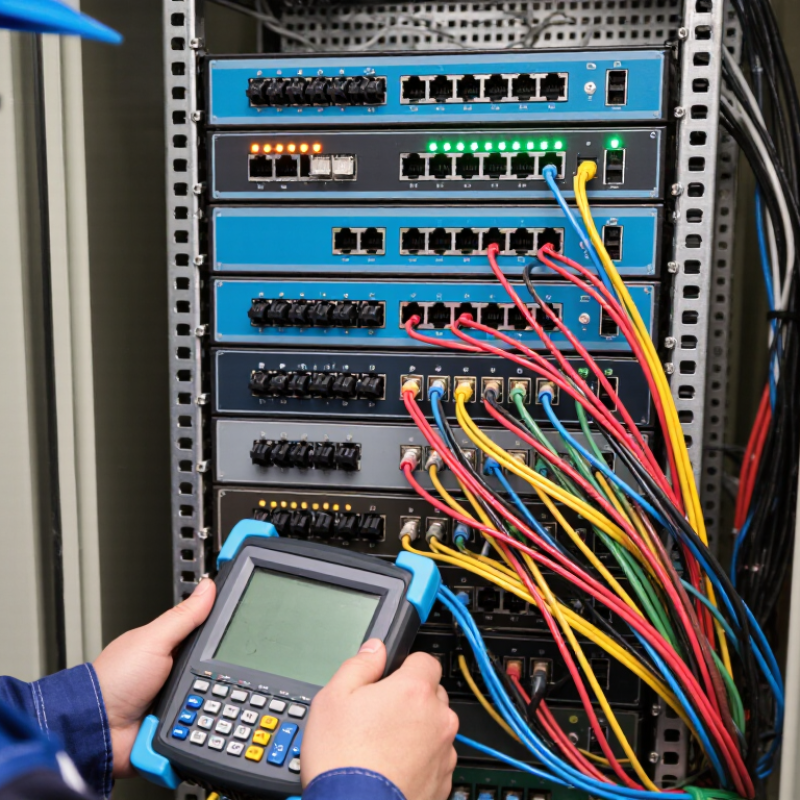
An industrial managed PoE switch is built for demanding environments and combines Ethernet power delivery with configurable network controls. It sends data and electrical power through one Ethernet cable, often to cameras, wireless access points, or sensors. “Industrial” usually means a rugged enclosure, a wide operating temperature range, and tolerance for vibration or electrical noise. Exact limits vary, so check the datasheet rather than relying on the label alone.
Managed features let technicians configure VLANs, monitor link status, prioritize traffic, and review alarms remotely. On a factory floor, this can help separate camera traffic from control-system data and identify a failed cable without checking every connection. PoE standards and available power budgets matter. A switch may support several powered ports yet lack enough total power for every device at full demand. Allow for startup peaks and cable length. Small details matter.
Tips: Confirm input voltage, temperature rating, mounting method, and total PoE budget before installation. Test with the actual devices, especially inside a warm cabinet. Keep a port map and save the configuration; people can forget to update them after a quick field change. That happens.
Best Industrial Managed PoE Switches in 2026
How Industrial Managed PoE Switches Work
An industrial managed PoE switch carries network data and electrical power over Ethernet cables. The switch supplies power to connected devices, such as cameras, wireless access points, or sensors. These devices are called powered devices, or PDs. During connection, the switch checks whether a device can receive power and how much it needs. This helps prevent unsuitable devices from drawing power unexpectedly.
The “managed” part gives technicians control over network behavior. Through a web interface or network management tools, they can configure VLANs, prioritize time-sensitive traffic, and check port status. Some switches also report power use, temperature, and link errors. These details help identify issues, though monitoring cannot replace checking cables and equipment directly. A camera that keeps disconnecting may point to a loose connector, a damaged cable, or a power budget that is too small.
Tips: Check the switch’s total PoE budget, not just its per-port rating. Leave headroom for devices that draw more power during startup. Use suitable Ethernet cable, and test the actual cable run. Small checks matter.
For 2026, compare industrial managed PoE switches by usable power, not just port count. Start with power. IEEE 802.3bt-2018 specifies up to 90 watts from the power-sourcing equipment, with up to 71.3 watts available to a powered device. Check the total PoE budget under full load, especially when cameras, wireless access points, or sensors share a cabinet. Cable length and heat can reduce practical margins. Look for a documented operating-temperature range, redundant power inputs, surge protection, and clear alarm reporting. A specification sheet is useful, but a hot cabinet reveals more.
Compare security and recovery features, too. The 2024 Verizon Data Breach Investigations Report found vulnerability exploitation as an initial access method rose 180% year over year. That figure covers breaches broadly, not industrial switches alone. Still, it supports checking for VLANs, access controls, secure management, and regular firmware updates. For uptime, review ring-recovery performance, QoS, and multicast support; then test recovery with the actual network topology. Fiber uplink options and switching capacity matter when several video streams run together. One oversight is easy: advertised port speed does not guarantee smooth performance under every traffic load. Read the test conditions.
Leading industrial managed PoE switches in 2026 are best judged by how reliably they serve a specific site, not by port count alone. A warehouse camera network may need a different switch than a roadside sensor cabinet. Check the total PoE power budget, supported power per port, and expected load during startup. Leave headroom for added devices. A fully loaded switch can become a weak link.
Management features matter in daily operation. VLANs can separate cameras, access points, and control devices. Quality-of-service settings help prioritize time-sensitive traffic. Look for clear port diagnostics, event logs, and remote monitoring. In a cabinet with limited airflow, confirm the rated operating temperature and cooling design. Redundant power inputs or network paths may also reduce disruption, but only when the wider system supports them. Real site conditions are sometimes messier than a specification sheet suggests.
Tips: Map every device and its power draw before choosing a model. Test alerts, recovery, and remote access on a small deployment first. Record the results; memory is unreliable.
A strong shortlist should match the installation environment, expansion plans, and the team’s ability to manage the interface. Compare specifications carefully, then verify critical functions in a representative setup. There is no universal best choice. Sometimes the less impressive option is easier to maintain.
Choosing an industrial managed PoE switch starts with the devices, not the port count. List each camera, access point, sensor, and controller, then note its power draw and link speed. Add reserve capacity to the PoE budget for startup peaks and future devices. Small margins matter. A switch that powers every device on paper may struggle when several units boot together.
Next, match the hardware to the site. Check its operating-temperature range, mounting options, vibration exposure, and enclosure requirements. In a cabinet near a production line, heat and dust are practical concerns. They affect reliability. Verify cable distances, uplink speeds, and redundancy options before ordering. Cable routes are easy to underestimate; measure the real path, including service loops.
Management features should suit the people maintaining the network. VLANs can separate cameras from control devices, while QoS can prioritize time-sensitive traffic. Look for clear logs, remote configuration, and useful alerts, but avoid features nobody will maintain. Check firmware support and access controls, then test a switch with representative devices before scaling. A bench test is imperfect. It can still reveal power, compatibility, and monitoring issues before installation.
„Thanks to the LUVIR technology, the solder resist process could be switched directly from the previously used mask exposure to direct exposure. As an outstanding digital solution on the market, this technology has been able to demonstrate fast process times and superior quality on our certified conventional ink in production. This allowed us to fully digitize the solder mask process at low cost – without process or ink adjustments. An excellent benefit to our production in Rot am See.“
Ralf Göhringer (Head of Production WE Rot am See)
I would definitely recommend the Limata machine and team for a future company purchase
Michael Greenaway
Compunetics Inc.
“The Limata ldi has been amazing!! Best thing we did was buy this machine”
Richard Brady
GM
Circuitlabs
“Since 2019, we have been running the Limata X1000 LDI system (including LUVIR for solder mask imaging) in daily production as an addition to our current process with film. The machine was capable of properly exposing Taiyo PSR-4000 BN (DI) solder mask types on normal to high-copper boards using a new and unique direct imaging process. The machine operating interface is very user friendly which allowed for a quick technical training curve. The pre-registration processing reduced several seconds of production time at every print. Limata support and service staff is incomparable. They supported our team every step of the way at basically any time of the day or night, with literally, an immediate response time, customizing the software interface to best fit our Operations and needs.
We have exposed more than 8,000 prints since end of October, on various solder mask colors and some resist film panels. Limata, has proven to be very capable and innovative. They are a strong contender in the industry.
We have very much enjoyed this project, and working with the team!
Thank you Limata for the continued support and being a part of our growth.”
Bill Sezate
Vice President, GM
Summit Interconnect
As a replacement to our current contact exposure process with film, the LIMATA X2000 system including LUVIR-Technology was capable of properly exposing non-LDI solder mask types using a direct imaging process. The machine offers cutting edge software with a very intuitive operating interface which allowed for quick technician training curve. The dual drawer system combined with pre-registration processing reduced several seconds of production time at every machine cycle. Limata support and service staff is world class. They added software patches to keep production running at shortest possible response times, customized the software interface to best fit our in-house Operations system, and even wrote a step-by-step machine processing manual. As a result of the project, we have exposed more than 16,000 times on various product types and solder mask brands/colors. Limata, in a very short timeframe as a company, has definitely shown they are truly innovative and will be challenging the industry of direct imaging for the top spot.
Kevin Beattie
Process Engineer
TTM Technologies
Forest Grove Division