Choosing the best Low Noise Fan in 2026 means listening beyond the product label. A low decibel rating can help, but it does not describe every sound you will hear. Blade hum, motor tone, airflow, and vibration through a desk or wall can all affect comfort. A fan may sound gentle across a large room, then feel distracting beside a bed. Small details matter.
Soundscape scholar R. Murray Schafer wrote, “Noise is any unwanted sound.” That idea is useful here: quietness is not only a number; it is also how a fan feels in your own space. Compare sound ratings at similar distances, and check whether the fan maintains useful airflow on its quieter settings. Listen for rattles and pulsing tones, too. No fan is truly silent. Room acoustics matter.
This guide will examine practical choices for bedrooms, offices, and shared spaces, with attention to measured noise, airflow, controls, and long-term usability. It will also consider where published specifications leave questions unanswered. A test figure is only a snapshot. Real rooms are messier. The best Low Noise Fan is not automatically the one with the smallest number on its box; it is the one that moves enough air without becoming the sound you notice all night.
What Is the Best Low Noise Fan in 2026?
What Makes a Fan Truly Low Noise?
A quiet fan is more than a low number on a product label. Its sound should be measured at a stated distance and speed, because airflow settings and room conditions affect what people hear. The WHO’s 2009 Night Noise Guidelines for Europe recommend keeping indoor bedroom noise below 30 dB LAeq at night for good-quality sleep. That figure covers the room’s overall noise, not a fan rating alone. It offers useful context, not a pass-or-fail test for one appliance. A steady broadband hush may feel less intrusive than a similar-level hum with a sharp tonal edge. Loose grilles, unbalanced blades, and vibration against a desk can also add rattles. Small details matter.
Tips: Compare sound readings taken at the same distance and speed. Look for test methods such as ANSI/AMCA Standard 300, which specifies laboratory procedures for measuring fan sound. A single dBA figure rarely tells the whole story.
For a practical check, listen at the distance where you plan to use the fan. Try its lowest and most-used settings in a quiet room. Notice whether the sound stays even as the blades turn, and whether the housing buzzes on a hard surface. Specs help narrow choices, but listening conditions vary. A rating can look precise and still leave out the sound that bothers you.
| Fan Type or Feature | Typical Sound Level* | What Affects Noise | What to Look For | Best Use |
|---|---|---|---|---|
| Ceiling fan on a low setting | About 25–35 dBA | Motor quality, blade balance, installation, and speed | Stable mounting, balanced blades, and a smooth low-speed setting | Bedrooms and larger rooms where steady, broad airflow is preferred |
| Desk or pedestal fan on a low setting | About 30–45 dBA | Blade design, grille turbulence, motor vibration, and airflow speed | Several usable speed settings, a stable base, and no rattling during operation | Personal cooling at a desk or beside a bed |
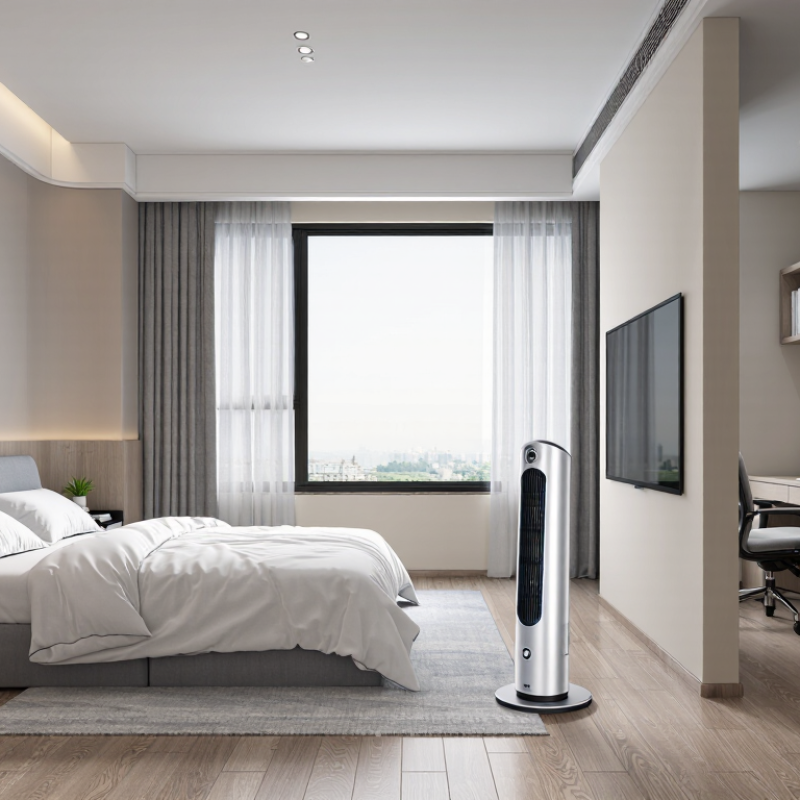
| Tower-style room fan | About 35–50 dBA | Air moving through the housing, oscillation, and fan speed | Quiet operation at the setting you will actually use; check for tones or clicks as well as loudness | Rooms where a narrow footprint and broad air distribution matter |
| Small USB or clip-on fan | About 30–45 dBA | Small, fast-spinning blades and vibration transferred to a desk or shelf | A secure mount and a low setting that does not produce a high-pitched whine | Close-range personal airflow in compact spaces |
| Motor and speed control | Varies by fan and setting | Electrical hum, motor vibration, and rapid changes in rotational speed | Listen at low, medium, and high settings; a quiet low setting is more useful than a quiet setting with inadequate airflow | Any room where the fan will run for extended periods |
| Blade and airflow design | Varies by airflow and distance | Turbulence from blades, guards, nearby walls, or objects in the airflow path | Smooth airflow without strong buffeting, fluttering, or grille noise | Quiet operation near people or during sleep |
| Build, balance, and placement | Not a fixed sound level | Loose parts, unbalanced blades, hard surfaces, and vibration through furniture or floors | Firm assembly, a stable surface, and no rattles or wobble during use | Especially important in quiet rooms and at night |
| Practical low-noise choice | Compare measured dBA at the same distance and setting | Specifications can use different distances, rooms, and test conditions | Choose the quietest fan that still provides enough airflow for the room; check independent measurements when available | The best choice depends on room size, airflow needs, and sensitivity to sound |
*Sound ranges are approximate examples, not guarantees or directly comparable ratings. Actual noise varies with model, speed, installation, room acoustics, and measurement distance. A-weighted decibels (dBA) are commonly used for sound ratings; compare figures only when test conditions are similar.
A fan’s noise is shaped by how smoothly it moves air, not simply by its motor. Narrow blade tips, sharp edges, and turbulent flow can create a rushing or tonal sound. A larger fan running more slowly may deliver the same airflow with less blade-tip noise, though grille resistance and poor installation can erase that advantage. Listen for both kinds of sound: a steady hum and the hiss of air.
Professional ratings help separate design from marketing. AMCA 210/ASHRAE 51 sets laboratory methods for measuring fan airflow and aerodynamic performance; AMCA 300 covers sound testing. Compare sound ratings only alongside airflow, and check that products were tested under comparable conditions. ENERGY STAR Version 4.0 sets a maximum of 1.0 sone for qualifying residential ventilation fans rated at 100 CFM or less, and 2.0 sones for those above 100 CFM. Sones are a perceived-loudness measure, not a direct substitute for decibels.
Small details matter. A soft vibration against a loose ceiling panel can sound louder than the fan itself. Mounting, duct bends, and an undersized outlet can add resistance, making the fan work harder. I would not judge a fan from its lowest-speed rating alone; real rooms are imperfect, and airflow needs change. Check the airflow and sound figures at the speed you will actually use.
The best low-noise fan depends on the room, not just its advertised sound level. For a bedroom, choose a ceiling fan with several speeds and broad blades; it can move air gently without a strong draft at pillow height. A compact desk fan suits a study, where focused airflow helps, but place it away from papers and avoid aiming it directly at your face. Quiet matters most at night.
For a narrow room or shared office, a tower fan saves floor space and spreads airflow vertically. Its slim grille can create a softer-feeling breeze, though low speed still matters; no fan is silent. Compare sound ratings measured using the same method. AMCA Publication 300 describes standardized laboratory procedures for testing fan sound, making tested ratings more useful than vague “quiet” claims.
The U.S. Department of Energy’s Energy Saver guidance says ceiling fans can let occupants raise a thermostat setting by about 4°F without reducing comfort. That figure concerns comfort, not noise, but it shows why room coverage matters. A fan that is too small may need to run faster.
Check the lowest-speed setting, too. Specs rarely tell the whole story. A bare bedroom and a carpeted one may sound different.
What Is the Best Low Noise Fan in 2026?
How to Compare Low Noise Fans in 2026
The quietest fan is not always the best choice for your room. Compare airflow and sound together, preferably at similar airflow levels rather than identical speed settings. A low decibel figure can be useful, but check how and where it was measured. Test conditions differ, and a soft hum may feel more distracting than a slightly louder rush of air. Listen at home.
Consider how you will use the fan. For a bedroom, check its lowest setting and listen from pillow distance, not just beside the grille. For a desk, look for steady airflow that does not make papers flutter. Also check for rattling on a hard floor; a small vibration can change the sound noticeably. I would not trust one number alone. Even careful comparisons can miss how a fan sounds in your own space, and that is an imperfect part of choosing.
Tips: Compare airflow, sound, and power use at the settings you will actually use. Place each fan in the same spot, then listen for a few minutes with other devices turned off. Check return terms before buying, since comfort is personal.
Choosing a quiet fan starts with the room, not a “silent” label. In a bedroom, prioritize steady airflow at low speed, a stable mount, and a published sound rating in decibels (dBA). Compare ratings only when the testing distance and fan speed match; otherwise, the numbers may mislead. A fan can sound gentle in a showroom but irritating beside a pillow. Specs vary. I find that frustrating. If sound data is missing, listen at the intended speed before buying, and check the return terms.
Match the fan type to the space: a ceiling fan suits broad circulation, while a portable fan can direct air toward a desk or bed. The U.S. Department of Energy says ceiling fans can allow a thermostat setting about 4°F higher without reducing comfort. ENERGY STAR reports that certified ceiling fans are about 60% more efficient than conventional fan-and-light units. Efficiency does not guarantee quiet operation, though. Check motor noise, blade wobble, and speed controls in person when possible. At home, test the fan from your pillow, not across the room. Small details matter. A slightly less powerful fan may be the better choice if its low setting stays comfortable through the night.
„Thanks to the LUVIR technology, the solder resist process could be switched directly from the previously used mask exposure to direct exposure. As an outstanding digital solution on the market, this technology has been able to demonstrate fast process times and superior quality on our certified conventional ink in production. This allowed us to fully digitize the solder mask process at low cost – without process or ink adjustments. An excellent benefit to our production in Rot am See.“
Ralf Göhringer (Head of Production WE Rot am See)
I would definitely recommend the Limata machine and team for a future company purchase
Michael Greenaway
Compunetics Inc.
“The Limata ldi has been amazing!! Best thing we did was buy this machine”
Richard Brady
GM
Circuitlabs
“Since 2019, we have been running the Limata X1000 LDI system (including LUVIR for solder mask imaging) in daily production as an addition to our current process with film. The machine was capable of properly exposing Taiyo PSR-4000 BN (DI) solder mask types on normal to high-copper boards using a new and unique direct imaging process. The machine operating interface is very user friendly which allowed for a quick technical training curve. The pre-registration processing reduced several seconds of production time at every print. Limata support and service staff is incomparable. They supported our team every step of the way at basically any time of the day or night, with literally, an immediate response time, customizing the software interface to best fit our Operations and needs.
We have exposed more than 8,000 prints since end of October, on various solder mask colors and some resist film panels. Limata, has proven to be very capable and innovative. They are a strong contender in the industry.
We have very much enjoyed this project, and working with the team!
Thank you Limata for the continued support and being a part of our growth.”
Bill Sezate
Vice President, GM
Summit Interconnect
As a replacement to our current contact exposure process with film, the LIMATA X2000 system including LUVIR-Technology was capable of properly exposing non-LDI solder mask types using a direct imaging process. The machine offers cutting edge software with a very intuitive operating interface which allowed for quick technician training curve. The dual drawer system combined with pre-registration processing reduced several seconds of production time at every machine cycle. Limata support and service staff is world class. They added software patches to keep production running at shortest possible response times, customized the software interface to best fit our in-house Operations system, and even wrote a step-by-step machine processing manual. As a result of the project, we have exposed more than 16,000 times on various product types and solder mask brands/colors. Limata, in a very short timeframe as a company, has definitely shown they are truly innovative and will be challenging the industry of direct imaging for the top spot.
Kevin Beattie
Process Engineer
TTM Technologies
Forest Grove Division