For global buyers, finding a reliable source for a BMAX Mini PC takes more than comparing prices. Product listings may look similar, yet configurations, warranty terms, and communication standards can differ. The right supplier should explain those details clearly and provide current product specifications. Details matter.
A careful assessment starts with practical questions. Can the supplier confirm processor, memory, storage, ports, and power requirements in writing? Are product photos and sample units consistent with the quoted configuration? Can the company explain lead times, packaging, and after-sales support before an order is placed? Buyers should also request relevant business and product documents, then verify them independently where possible.
A polished product page is not proof of dependable service. Nor does a low quotation guarantee lower total costs once shipping, duties, or replacement handling are considered. These points can be easy to overlook, and even experienced buyers may miss a small specification change. That deserves attention.
This guide explores how to assess China-based suppliers offering BMAX Mini PC products for international orders. It focuses on verifiable information, clear communication, product consistency, and realistic support expectations. No supplier should be called “the best” without evidence that matches a buyer’s needs. A strong decision comes from checking the details, asking direct questions, and comparing written commitments—not relying on broad promises.
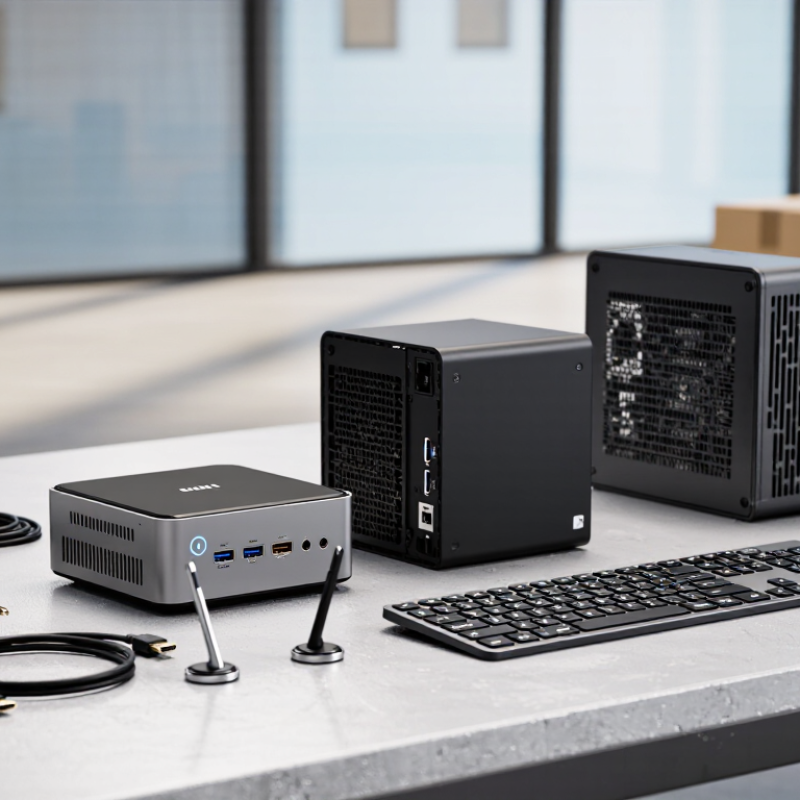
Mini PCs usually fit in palm-sized or roughly one-liter cases, with ports for displays, wired networks, and peripherals. Some mount behind a monitor; others sit on a desk, where cables and airflow need attention. Their small size suits reception desks, meeting rooms, digital signage, and office terminals. It does not make every model suitable for heavy rendering or constant high-performance workloads.
Power figures need careful reading. The U.S. EPA’s Version 8.0 Computer Specification evaluates typical energy use across operating modes and system configurations, rather than relying on adapter wattage alone. As a simple estimate, a 20-watt mini PC used eight hours daily consumes about 58 kWh per year: 20 × 8 × 365 ÷ 1,000. Actual use varies with processor load, memory, storage, and sleep settings. A low figure on a spec sheet can still mislead if it describes only idle operation.
Tips: Match ports and performance to the actual task. Check wired-network needs, monitor connections, and upgrade options before ordering. Measure power at the wall if energy cost matters. A compact machine can run warm in a cramped cabinet; airflow is easy to overlook.
IDC recorded 262.7 million PC shipments in 2024, showing the scale of the global computer market. Shipments are not the same as devices actively used by customers. That distinction matters. For global buyers, the figure provides context for ongoing demand, but it does not guarantee that every product category will grow equally. Mini PCs serve settings where space is limited, including reception counters, classrooms, and compact workstations. A smaller case saves desk space, but it does not ensure dependable performance. Check processor, memory, cooling, ports, and access for maintenance.
When evaluating suppliers, treat market statistics as background, not proof of product quality. Request a detailed configuration sheet and test a sample under realistic workloads. A brief demonstration may not reveal heat-related slowdowns after several hours. Confirm warranty coverage, lead times, packaging, and access to replacement parts. These checks take time. Skipping them can create costly surprises.
Tips: Compare identical configurations, not just product photos or headline prices. Test the ports and wireless connection you plan to use. Test before scaling.
| Market Measure | Reported Figure | Period | Context |
|---|---|---|---|
| Worldwide PC shipments | 262.7 million units | Full year 2024 | Global shipment estimate for traditional PCs, including desktops and notebooks. |
| Annual shipment change | +1.0% | 2024 year over year | Indicates a modest increase in worldwide shipments compared with 2023. |
| Worldwide PC shipments | 68.9 million units | Fourth quarter 2024 | Quarterly global shipment estimate reported for the final quarter of the year. |
| Quarterly shipment change | +1.8% | Fourth quarter 2024 year over year | Compares fourth-quarter shipments with the same quarter in 2023. |
| Market scope | Traditional PCs | IDC shipment tracking | Includes desktop computers, notebooks, and workstations; it is not a mini-PC-only market total. |
Source: IDC Worldwide Quarterly Personal Computing Device Tracker, preliminary 2024 shipment results. Shipment figures are market estimates and may be revised.
For global buyers, comparing compact desktop models starts with the processor, not the product name. Check the exact processor generation and power limit; two chips with similar labels can behave differently under sustained workloads. For office documents and video calls, a modest processor may be enough. Photo editing or frequent multitasking benefits from more headroom. Small details matter.
Memory affects how smoothly several apps run at once. Confirm both the installed capacity and whether memory can be upgraded. Storage deserves the same care: compare drive type, capacity, and available expansion, rather than relying on a headline figure. A fast drive can make startup and file access feel snappier, but it cannot compensate for too little memory. I would verify the configuration on the exact unit being shipped; listings can be unclear.
Ports shape daily use. Count the USB connections you need, then check display outputs, wired networking, and audio. A compact case may save desk space, but can leave less room for airflow. Review cooling design and independent workload tests when available. Fan noise matters in a quiet room. Heat does, too. Specifications alone are imperfect evidence, and I would not treat a brief test as a guarantee of long-term performance.
Compare representative compact, balanced, and expandable configurations across processor cores, memory, storage, USB ports, and cooling.
Values are illustrative configuration examples, not specifications for any particular product. Bars show each metric as a percentage of the highest value in this comparison; hover over a bar to see the example’s raw specification. Cooling is represented by the number of active fans.
A mini PC supplier’s testing should be visible, not just promised.
Ask for a sample from the same production line planned for your order. Check boot time, ports, Wi-Fi stability, and heat after several hours of ordinary use. A USB drive can reveal loose ports; a simple temperature log can flag poor cooling. Small details matter. Record test conditions and results, so later batches can be compared fairly. One limitation: a sample cannot prove every unit will perform identically.
Review compliance documents against the exact model and hardware revision you plan to buy. Confirm that certificates and test reports are current, readable, and issued for the relevant product, rather than a similar model. Requirements vary by destination, so ask a qualified local adviser when needed.
Read the warranty in writing: coverage period, exclusions, return shipping, repair or replacement process, and expected response times should be clear. Ask support a practical question before placing a large order, such as how to diagnose a unit that will not start. Notice whether the reply is specific and timely.
A polished quotation is easy to overvalue; consistent records and useful answers are less flashy, but more meaningful.
For a global mini PC order, confirm the minimum order quantity before discussing unit price. Ask whether the MOQ applies per configuration, shipment, or purchase order. A small pilot batch can reveal packaging or compatibility issues before a larger commitment. It may cost more per unit. Still, surprises cost more.
Put the chosen Incoterms 2020 rule and the exact named place in the sales contract. Under FCA, for example, the seller delivers goods to the carrier at the agreed location; the buyer generally arranges main transport. Responsibilities differ by rule, so verify who handles export clearance, insurance, and import charges. Incoterms do not settle payment terms or ownership transfer. This is easy to overlook. A freight forwarder can check whether the proposed route and handover point are practical.
Before dispatch, request carton dimensions, gross weight, tracking arrangements, and a packing list. Check that serial numbers and quantities match the invoice. Delays can happen, even with careful planning. Agree in writing on a return authorization process, inspection window, and responsibility for return freight. Keep photos of damaged cartons and test records for any reported fault. A clear process helps both sides assess a problem, though cross-border returns may still take time and incur costs.
„Thanks to the LUVIR technology, the solder resist process could be switched directly from the previously used mask exposure to direct exposure. As an outstanding digital solution on the market, this technology has been able to demonstrate fast process times and superior quality on our certified conventional ink in production. This allowed us to fully digitize the solder mask process at low cost – without process or ink adjustments. An excellent benefit to our production in Rot am See.“
Ralf Göhringer (Head of Production WE Rot am See)
I would definitely recommend the Limata machine and team for a future company purchase
Michael Greenaway
Compunetics Inc.
“The Limata ldi has been amazing!! Best thing we did was buy this machine”
Richard Brady
GM
Circuitlabs
“Since 2019, we have been running the Limata X1000 LDI system (including LUVIR for solder mask imaging) in daily production as an addition to our current process with film. The machine was capable of properly exposing Taiyo PSR-4000 BN (DI) solder mask types on normal to high-copper boards using a new and unique direct imaging process. The machine operating interface is very user friendly which allowed for a quick technical training curve. The pre-registration processing reduced several seconds of production time at every print. Limata support and service staff is incomparable. They supported our team every step of the way at basically any time of the day or night, with literally, an immediate response time, customizing the software interface to best fit our Operations and needs.
We have exposed more than 8,000 prints since end of October, on various solder mask colors and some resist film panels. Limata, has proven to be very capable and innovative. They are a strong contender in the industry.
We have very much enjoyed this project, and working with the team!
Thank you Limata for the continued support and being a part of our growth.”
Bill Sezate
Vice President, GM
Summit Interconnect
As a replacement to our current contact exposure process with film, the LIMATA X2000 system including LUVIR-Technology was capable of properly exposing non-LDI solder mask types using a direct imaging process. The machine offers cutting edge software with a very intuitive operating interface which allowed for quick technician training curve. The dual drawer system combined with pre-registration processing reduced several seconds of production time at every machine cycle. Limata support and service staff is world class. They added software patches to keep production running at shortest possible response times, customized the software interface to best fit our in-house Operations system, and even wrote a step-by-step machine processing manual. As a result of the project, we have exposed more than 16,000 times on various product types and solder mask brands/colors. Limata, in a very short timeframe as a company, has definitely shown they are truly innovative and will be challenging the industry of direct imaging for the top spot.
Kevin Beattie
Process Engineer
TTM Technologies
Forest Grove Division