Choosing a Sip Video Door Phone manufacturer is not only a matter of comparing screen sizes or catalog prices. Buyers should also check SIP compatibility, audio clarity, camera performance, installation options, and long-term technical support. Small details matter. An indoor monitor may look polished, yet still prove difficult to integrate with an existing intercom or access-control system. Compatibility should be confirmed against actual devices and software, not assumed from a product label.
China has a wide range of manufacturers, from established security-equipment suppliers to specialists serving building projects and private-label brands. This guide introduces ten companies for closer evaluation. It considers practical factors such as product range, manufacturing capabilities, customization, quality-control practices, and the availability of documentation and after-sales assistance. These factors help buyers form useful questions before requesting quotations or samples. They do not replace technical checks, reference calls, or a review of project requirements.
A ranked list can never fit every project. A small residential installation may value simple setup, while a large property may need centralized management and dependable integration. Even a detailed product page leaves questions unanswered. Buyers should verify current specifications, test representative equipment where possible, and clarify warranty and support terms in writing. The right supplier is not always the one with the longest catalog; sometimes, an overlooked integration detail changes the decision. There is room for judgment. This comparison aims to make that judgment more informed, while recognizing that supplier capabilities and product lines can change over time.
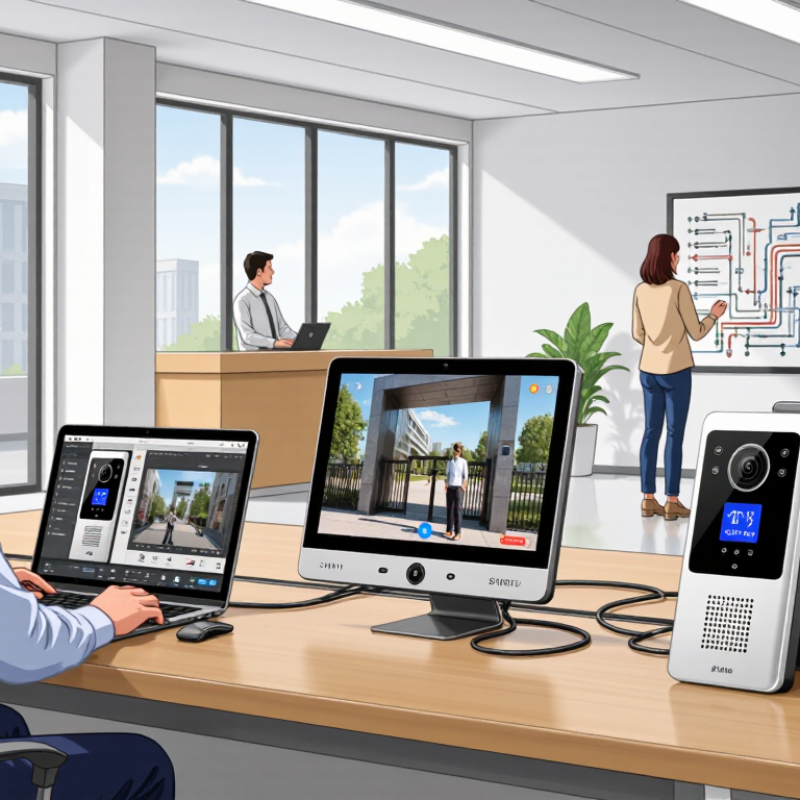
A SIP video door phone is an entrance device that lets a visitor call an indoor screen or another configured endpoint over an IP network. SIP, or Session Initiation Protocol, manages the call setup and termination; it does not carry the video itself. That distinction matters when checking compatibility. At the entrance, a camera captures the visitor, while a microphone and speaker support two-way conversation. A call button starts the request. Useful details include camera angle, night visibility, and clear audio near a busy sidewalk. Small parts matter.
Inside the unit, a processor handles call control, and a network interface connects it through Ethernet or Wi-Fi. Video and audio travel using separate media protocols, commonly over the same network. An indoor monitor, mobile client, or compatible phone can answer, depending on the system design. Many models also include a relay output for a connected door lock, but the phone itself does not guarantee secure access. Power may come through a network cable or a separate supply. Installation can look simple on paper. In practice, network quality, echo, weather exposure, and wiring affect daily performance. Test calls at the actual entrance reveal problems that a specification sheet may not.
SIP, or Session Initiation Protocol, sets up and ends calls between a video door phone and other devices. When a visitor presses the call button, the door phone sends a SIP request to an indoor monitor or a configured call server. The recipient rings and can accept or reject the call. SIP handles the conversation setup, not the video itself. Audio and video usually travel separately over a media stream, often using RTP.
That separation matters. It lets a system negotiate supported audio and video formats before the conversation begins. In practice, the door phone, network, and receiving device must agree on compatible settings. A small office might route calls directly to a lobby monitor, while a larger building may use a server to direct calls to several apartments. Network address translation and weak Wi-Fi can interrupt media even when the call appears connected. Setup is not always tidy. Installers should test calls at the actual doorway, check two-way audio, and confirm that video appears promptly. Security also depends on configuration: access controls and encrypted transport should be reviewed rather than assumed. A ringing screen is only part of a reliable connection.
A brand-neutral guide to ten common SIP video door phone system functions and technical considerations. These rows describe system technologies, not ranked or named manufacturers; available features vary by product and configuration.
| No. | System Area | How It Works | Common Technical Details | Practical Consideration |
|---|---|---|---|---|
| 1 | SIP Registration | An indoor monitor or door station can register with a SIP server so the system can locate and call that endpoint. | SIP registration uses REGISTER requests; SIP commonly uses port 5060 for UDP or TCP, while TLS commonly uses port 5061. | Ports and transport options are configurable; check the device and server settings rather than assuming defaults. |
| 2 | Call Initiation | When a visitor presses the call button, the door station can send an INVITE to an indoor monitor, receptionist, or configured group. | SIP INVITE and response messages establish and manage the call; SIP signaling is separate from the media stream in a typical setup. | Confirm call routing, ring groups, timeouts, and behavior when a destination is offline. |
| 3 | Session Negotiation | The endpoints exchange session details to agree on media formats, addresses, and ports for the call. | SDP is commonly carried in SIP messages to describe audio and video media parameters. | Both endpoints need compatible codecs and reachable media paths for two-way audio and video. |
| 4 | Audio Communication | After call setup, the door station and answering endpoint exchange audio over a media transport, commonly RTP. | G.711 is a widely used narrowband audio codec; actual codec support depends on the endpoints and configuration. | Network quality, echo control, microphone placement, and speaker volume all affect conversation clarity. |
| 5 | Video Communication | The door station sends a live camera stream to the answering endpoint during the session. | H.264 is commonly used for video encoding; RTP is commonly used to carry real-time audio and video media. | Resolution, frame rate, bandwidth, and codec compatibility influence image smoothness and call performance. |
| 6 | Door Release | An authorized user can trigger the door station’s relay during or after a call to operate an electric lock. | Control may use DTMF, SIP INFO, a supported API, or another device-specific method; the relay is a physical output. | Verify the control method, relay ratings, lock type, and fail-safe or fail-secure behavior before installation. |
| 7 | Network and NAT Traversal | Endpoints on different network segments may need routing or traversal support so signaling and media can reach each other. | Firewall rules, NAT behavior, and media-port configuration can affect SIP signaling and RTP media independently. | Test calls across the actual VLANs, firewall policies, and remote-access paths used in deployment. |
| 8 | Power and Connectivity | Door stations connect to the network over Ethernet or, on some models, Wi-Fi; Ethernet models may support power over Ethernet. | IEEE 802.3af PoE provides up to 15.4 W at the power-sourcing equipment, with less available at the powered device after cable losses. | Check the device’s PoE class and power budget, especially when heaters, lights, or other accessories are connected. |
| 9 | Security | Systems can protect signaling and device access using encrypted transport, credentials, and network controls. | SIP over TLS can protect signaling in transit; SRTP may be used to protect media when supported and correctly configured. | Encryption support must be compatible at both ends; use unique credentials and restrict management access. |
| 10 | Interoperability and Integration | SIP-based endpoints can communicate with compatible SIP servers and other SIP devices, while additional integrations may require specific support. | Interoperability depends on shared SIP behavior, codecs, transport settings, and supported door-control features. | Validate calling, video, DTMF or unlock control, and recovery behavior in a compatibility test before rollout. |
China’s SIP video door phone landscape draws on a broad electronics supply chain, with manufacturing activity concentrated around major coastal production hubs. Suppliers combine camera modules, microphones, speakers, touch displays, and network interfaces in compact indoor and outdoor units. The details matter. A clear image is not enough: echo control, night visibility, and stable call setup shape daily performance.
SIP enables voice and video communication across compatible network devices, but implementation can vary. Buyers should check supported codecs, call-transfer behavior, power-over-Ethernet options, and interoperability with existing access systems. Test the actual setup. A lab call may sound clean, while a hallway’s hard surfaces create echo and uneven speech.
Market figures offer context, not a direct count of door-phone factories. MarketsandMarkets’ Physical Security Market report estimated the global market at USD 110.5 billion in 2023 and projected USD 135.1 billion by 2028. This broad category includes products beyond video door phones, so it should not be read as a device-sales estimate. For manufacturers, practical evaluation includes checking audio in noisy corridors, confirming weather resistance, and reviewing firmware-update procedures. Specifications can look tidy on paper. Real installations are less tidy.
Profiles of 10 Chinese SIP video door phone manufacturers can help buyers compare capabilities beyond product photos. Each profile should clarify whether the supplier focuses on apartment buildings, offices, or mixed-use sites. These needs differ. A lobby panel may require a wide-angle camera, clear night imaging, and durable buttons. An indoor monitor needs readable menus and reliable call handling. Look for details on SIP compatibility, network configuration, PoE options, and integration with access-control systems. These features affect installation, not just the specification sheet.
A sound profile also separates verified information from sales language. Check whether the manufacturer provides product manuals, firmware update guidance, and test reports for the exact model under review. Ask how technical support handles configuration problems across different SIP systems. Factory capacity and customization options matter, but they do not prove long-term reliability. The profiles should identify gaps too: public information may not show real-world failure rates or response times. That limitation is worth noting.
Tips: Request a sample, test calls on your own network, and check image quality in low light. Confirm warranty terms and spare-part availability in writing. A small trial can reveal awkward menus or echo that a brochure misses. It is not a complete assessment, but it is a practical start.
In any comparison of leading SIP video door phone manufacturers, application fit matters more than a ranked list. Apartment entrances need clear two-way audio, reliable indoor call routing, and simple resident access. At a small office, staff may value directory search and integration with an existing SIP phone system. Outdoor stations face rain, glare, and temperature changes; check the stated protection rating and test camera visibility in daylight and at dusk. Small details matter. A weak microphone can make a polished video feed frustrating to use.
Selection should cover SIP compatibility, power options such as PoE, camera resolution, viewing angle, and support for access-control devices. Ask how firmware updates are handled and whether administrators can set strong credentials and separate user roles. No checklist catches every site condition. Measure network performance at the entrance, not only beside the router. Industry trends include mobile call answering, higher-resolution cameras, and analytics that can flag activity. These features may help, but they add setup and privacy considerations. One trade-off remains: more functions do not always mean easier daily use. Test call delay, night images, and door-release response with the actual network and wiring before choosing a system.
Bars show the pixel count of common video formats, not measured product performance or market adoption. When evaluating SIP video door phones, also check the actual stream resolution, network bandwidth, low-light image quality, field of view, and SIP interoperability.
„Thanks to the LUVIR technology, the solder resist process could be switched directly from the previously used mask exposure to direct exposure. As an outstanding digital solution on the market, this technology has been able to demonstrate fast process times and superior quality on our certified conventional ink in production. This allowed us to fully digitize the solder mask process at low cost – without process or ink adjustments. An excellent benefit to our production in Rot am See.“
Ralf Göhringer (Head of Production WE Rot am See)
I would definitely recommend the Limata machine and team for a future company purchase
Michael Greenaway
Compunetics Inc.
“The Limata ldi has been amazing!! Best thing we did was buy this machine”
Richard Brady
GM
Circuitlabs
“Since 2019, we have been running the Limata X1000 LDI system (including LUVIR for solder mask imaging) in daily production as an addition to our current process with film. The machine was capable of properly exposing Taiyo PSR-4000 BN (DI) solder mask types on normal to high-copper boards using a new and unique direct imaging process. The machine operating interface is very user friendly which allowed for a quick technical training curve. The pre-registration processing reduced several seconds of production time at every print. Limata support and service staff is incomparable. They supported our team every step of the way at basically any time of the day or night, with literally, an immediate response time, customizing the software interface to best fit our Operations and needs.
We have exposed more than 8,000 prints since end of October, on various solder mask colors and some resist film panels. Limata, has proven to be very capable and innovative. They are a strong contender in the industry.
We have very much enjoyed this project, and working with the team!
Thank you Limata for the continued support and being a part of our growth.”
Bill Sezate
Vice President, GM
Summit Interconnect
As a replacement to our current contact exposure process with film, the LIMATA X2000 system including LUVIR-Technology was capable of properly exposing non-LDI solder mask types using a direct imaging process. The machine offers cutting edge software with a very intuitive operating interface which allowed for quick technician training curve. The dual drawer system combined with pre-registration processing reduced several seconds of production time at every machine cycle. Limata support and service staff is world class. They added software patches to keep production running at shortest possible response times, customized the software interface to best fit our in-house Operations system, and even wrote a step-by-step machine processing manual. As a result of the project, we have exposed more than 16,000 times on various product types and solder mask brands/colors. Limata, in a very short timeframe as a company, has definitely shown they are truly innovative and will be challenging the industry of direct imaging for the top spot.
Kevin Beattie
Process Engineer
TTM Technologies
Forest Grove Division