Choosing a Refurbished Dell PowerEdge Server starts with the work it must do, not the lowest listing price. A file server for a small office has different needs from a virtualization host supporting many workloads. Note expected users, applications, storage growth, and peak demand before comparing models. Keep it realistic. More processor cores do not always mean better performance; memory capacity, clock speed, and software requirements matter too. Check the specific generation and configuration, since two servers with the same model name can have very different components.
Read the listing carefully. Confirm the processor model, installed and supported memory, drive types, RAID controller, network ports, power supplies, and included rails. Ask whether drives are included, tested, and covered by warranty. Request the service tag and verify the configuration through reliable Dell documentation where possible. A reputable seller should explain its inspection process, disclose cosmetic wear, and state what the warranty covers. Look for clear return terms and support options, not just a low price. Also consider rack depth, noise, heat, and power draw; a server that fits the budget may still overwhelm a quiet office. Even careful checks leave some uncertainty with older equipment. I would not ignore that. Compare the total cost of the server, storage, shipping, and likely maintenance against your workload and expected service life. With those details in hand, you can choose a refurbished system that fits today’s needs without paying for capacity you may never use.
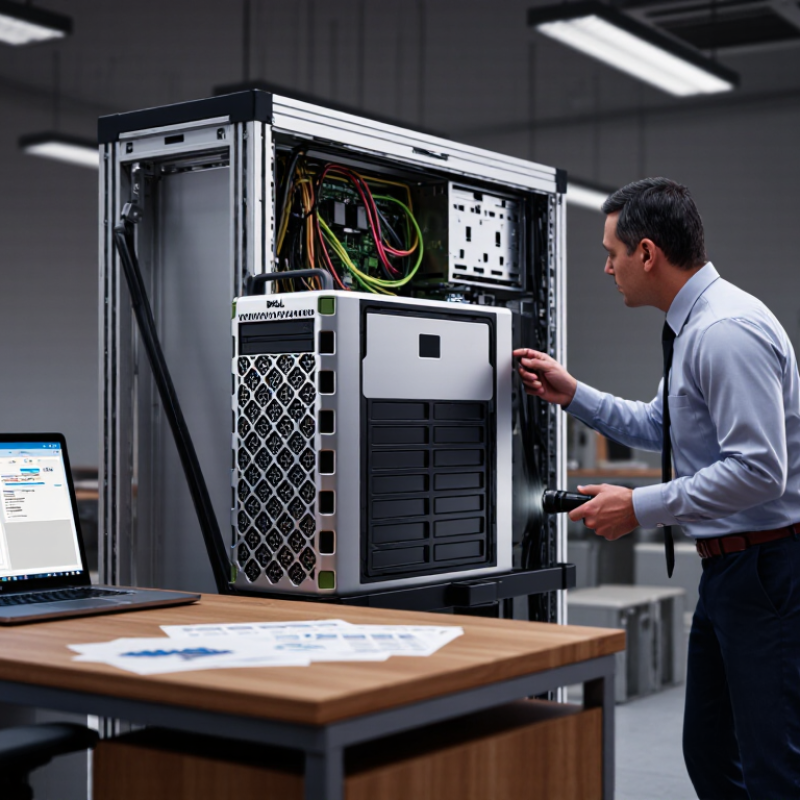
A refurbished rack server should match the work it will actually run, not just look powerful on a specification sheet. List your main applications, user count, and busiest operating periods. A database serving dozens of staff may need fast storage and strong memory capacity. A backup system may benefit more from large, reliable drives. Measure current CPU use, memory consumption, and storage growth where possible. Estimates are useful, but they can be wrong.
Check the processor generation, core count, memory type, and maximum supported memory. Then compare them with your software’s requirements. For virtual machines, leave headroom for growth and avoid filling every memory slot immediately. Review drive health reports and confirm the server supports the storage interface you need. Also consider noise, power draw, and available rack space. These details matter in a small office. I still find power costs easy to overlook.
Tips: Write down expected workloads before comparing configurations. Test representative applications after setup, and watch resource use during busy periods. If performance is uneven, check storage latency and memory pressure before assuming the processor is too slow. A little caution saves trouble.
Choose the server generation around the work it must perform. Virtualization needs balanced processor cores, memory capacity, and fast storage; database workloads may benefit from higher clock speeds and ample memory. Check the exact processor generation, supported memory type, drive bays, expansion slots, and remote-management features. A familiar model name is not enough.
Power and cooling matter, even in a small office. Uptime Institute’s 2024 Global Data Center Survey reported average rack density of about 8.2 kW. That figure is a useful reminder to check the server’s actual power draw and airflow needs, not just its purchase price. Measure first. Compare the configuration’s rated power supply capacity with your workload, and confirm that the rack can handle its depth and weight.
For a refurbished unit, ask for the precise component list and test results. Check memory error logs, storage health, fan noise, and firmware status; request evidence that every drive bay and network port works. Match the installed memory and storage to your planned workload, while leaving room for realistic growth. It is easy to overbuy here. I would also verify replacement-part availability and warranty terms before choosing an older generation. A lower price can look compelling, but unsupported components may make routine maintenance harder.
A refurbished rack server should arrive with a clear service record, not just a polished chassis. Ask for refurbishment dates, replaced parts, and diagnostic results. Check the motherboard for corrosion, bent pins, and uneven heatsink pressure. Inspect memory slots, power connectors, and fan bearings for dust, discoloration, or damage. Labels can mislead. Confirm that the installed processors, memory, storage, and network adapters match the quoted configuration. Request evidence of memory tests, storage health checks, and sustained-load testing. Test under load. Fans should respond smoothly, and temperatures should remain stable without unexplained throttling.
Component history matters. Backblaze’s 2023 Drive Stats report recorded a 1.70% annualized failure rate across its tracked hard drives; this is not a refurbished-server failure rate, but it shows why storage health deserves evidence, not guesswork. Uptime Institute’s 2024 outage analysis found that 54% of respondents’ most recent significant outages cost at least $100,000. That figure is not specific to refurbished equipment, yet it underscores the value of checking power supplies, cooling, and redundancy. Ask whether replacement parts are tested and whether firmware and system logs are reviewed. A clean chassis can hide worn fans or aging drives. I can still give cosmetic condition too much weight, so I separate appearance from test results and written warranty terms. No checklist removes every uncertainty.
Use this checklist to compare inspection evidence, component condition, and seller documentation. Acceptance criteria should be confirmed against the server’s configuration and intended workload.
| Inspection Area | What to Check | Evidence of Good Condition | Potential Warning Sign |
|---|---|---|---|
| Refurbishment record | Ask for the work performed, parts replaced, and final test results. | A dated inspection report identifies the tested system and lists repairs or replacements. | Only a generic “tested” claim, with no record of work or verification. |
| Chassis and connectors | Inspect the frame, drive bays, rails, ports, and internal mounting points. | No structural damage, loose connectors, severe corrosion, or missing parts needed for the configuration. | Bent chassis, damaged port housings, or loose drive trays and card brackets. |
| Processor and memory | Confirm installed processor and memory match the itemized configuration; review system logs. | Configuration is documented, and memory tests complete without reported errors. | Unexplained configuration differences, memory errors, or recurring hardware alerts. |
| Storage drives | Check drive model, capacity, interface, health data, and error history where available. | Drive inventory is disclosed; health indicators and diagnostic tests show no critical warnings. | Unreported drive substitutions, critical health warnings, or rising error counts. |
| Power supplies | Verify the number and ratings of installed power supplies and test system power-on. | Supplies are correctly seated, report normal status, and match the stated configuration. | Power faults, damaged connectors, or a missing supply in a configuration requiring redundancy. |
| Cooling and fans | Check fan operation, airflow, dust buildup, and temperature readings under load. | Fans operate without persistent warnings; temperatures remain within the system’s documented limits. | Repeated fan alerts, obstructed airflow, unusual noise, or thermal shutdowns. |
| Firmware and logs | Review firmware versions, hardware event logs, and any unresolved alerts. | Versions and alert history are disclosed; critical errors have been investigated and documented. | Logs are unavailable, critical events recur, or management access is not demonstrated. |
| Network and expansion | Test each required network port and confirm installed expansion cards and slots. | Required ports are detected and pass connectivity checks; expansion parts match the listing. | Port failures, missing cards, or untested components included in the quoted configuration. |
| Functional testing | Request a documented boot test and, when appropriate, a sustained workload test. | Tests complete without unexpected shutdowns, hardware errors, or abnormal temperature alerts. | Testing is limited to powering on, or results cannot be tied to the system being sold. |
| Included parts and support | Confirm rails, bezels, cables, licenses if applicable, return terms, and warranty coverage. | Included items and coverage period are clearly stated in writing before purchase. | Important accessories or coverage terms are unspecified or excluded from the listing. |
A refurbished rack server can look clean and still fail your workload. Check the exact model, processor generation, memory type, drive interface, network adapters, and firmware support. Match these against your operating system, hypervisor, and application requirements. Measure rack depth, rail fit, and power draw too. A listing that says “compatible” is not enough; request a full parts list and clear photos of the chassis label.
Warranty details matter. Get the coverage period, return window, exclusions, and repair-response target in writing. Confirm whether support includes replacement parts, diagnostics, and firmware access, and who handles escalation. Uptime Institute’s 2024 Annual Outage Analysis reported that 54% of respondents’ most recent significant outages cost over $100,000. That figure is not a server-specific estimate, but it shows why support gaps deserve attention. Some refurbished listings are incomplete. I would pause before buying one.
Tips: Ask the seller to verify the serial number, installed memory, drive backplane, and power supplies in writing. Test all drive bays and ports during the return period. Keep the quote and configuration sheet; small mismatches can become expensive surprises. A longer warranty is useful, but only if replacement parts and service are actually available.
A low purchase price can hide expensive gaps. Compare refurbished rack servers by usable configuration, not chassis price alone. Record the processor, memory, drive type, network cards, rails, and included warranty. Then add shipping, setup, power, likely replacement parts, and support fees. A cheaper unit with mismatched drives may cost more after installation. Check whether the seller provides component-level specifications and a written return process. Small details matter.
Seller reliability affects the real cost of ownership. Uptime Institute’s 2024 Annual Outage Analysis reported that 54% of respondents’ most recent significant outages cost more than $100,000. That figure is not a prediction for one server, but it shows why support and replacement speed deserve attention. Ask for burn-in test records, a clear warranty period, and the process for handling failed parts. Verify that quoted hardware matches the delivered inventory. Get answers in writing. A polished listing is not proof. I would still treat a vague warranty as a risk, even when the seller has strong reviews. Compare at least two written quotes, including service terms, before deciding.
Illustrative three-year comparison for the same server configuration. Costs are estimates in USD; reliability scores are planning ratings, not audited seller data.
Total cost combines estimated purchase price, a service and repair reserve, and energy use. The energy estimate assumes an average 150 W load, continuous operation, and electricity at $0.15/kWh. Compare written warranty terms, return windows, and component details before buying.
„Thanks to the LUVIR technology, the solder resist process could be switched directly from the previously used mask exposure to direct exposure. As an outstanding digital solution on the market, this technology has been able to demonstrate fast process times and superior quality on our certified conventional ink in production. This allowed us to fully digitize the solder mask process at low cost – without process or ink adjustments. An excellent benefit to our production in Rot am See.“
Ralf Göhringer (Head of Production WE Rot am See)
I would definitely recommend the Limata machine and team for a future company purchase
Michael Greenaway
Compunetics Inc.
“The Limata ldi has been amazing!! Best thing we did was buy this machine”
Richard Brady
GM
Circuitlabs
“Since 2019, we have been running the Limata X1000 LDI system (including LUVIR for solder mask imaging) in daily production as an addition to our current process with film. The machine was capable of properly exposing Taiyo PSR-4000 BN (DI) solder mask types on normal to high-copper boards using a new and unique direct imaging process. The machine operating interface is very user friendly which allowed for a quick technical training curve. The pre-registration processing reduced several seconds of production time at every print. Limata support and service staff is incomparable. They supported our team every step of the way at basically any time of the day or night, with literally, an immediate response time, customizing the software interface to best fit our Operations and needs.
We have exposed more than 8,000 prints since end of October, on various solder mask colors and some resist film panels. Limata, has proven to be very capable and innovative. They are a strong contender in the industry.
We have very much enjoyed this project, and working with the team!
Thank you Limata for the continued support and being a part of our growth.”
Bill Sezate
Vice President, GM
Summit Interconnect
As a replacement to our current contact exposure process with film, the LIMATA X2000 system including LUVIR-Technology was capable of properly exposing non-LDI solder mask types using a direct imaging process. The machine offers cutting edge software with a very intuitive operating interface which allowed for quick technician training curve. The dual drawer system combined with pre-registration processing reduced several seconds of production time at every machine cycle. Limata support and service staff is world class. They added software patches to keep production running at shortest possible response times, customized the software interface to best fit our in-house Operations system, and even wrote a step-by-step machine processing manual. As a result of the project, we have exposed more than 16,000 times on various product types and solder mask brands/colors. Limata, in a very short timeframe as a company, has definitely shown they are truly innovative and will be challenging the industry of direct imaging for the top spot.
Kevin Beattie
Process Engineer
TTM Technologies
Forest Grove Division