Choosing the right Portable Ring Light is less about buying the brightest model and more about matching light to real work. Wyzowl’s 2025 Video Marketing Statistics report says 89% of businesses use video marketing. Adobe’s 2022 Future of Creativity Study estimated that 165 million creators joined the global creator economy in two years. These figures show why clear, consistent lighting matters for creators, sellers, and remote professionals. They do not prove that a ring light improves every video.
A useful choice starts with the setting. A creator filming beside a laptop needs different coverage from someone recording makeup details at a desk. Check adjustable brightness, color temperature, and color accuracy; a bright lamp can still make skin look washed out. Look for stable mounting, simple controls, and a battery or USB power option that suits your setup. Small details matter. A loose phone holder or awkward cable can disrupt a short recording session.
This guide will compare size, light quality, power, mounting, and portability, then connect those features to common uses. It will also explain trade-offs between compact models and larger lights, including what product specifications can—and cannot—tell you. There is no perfect pick for everyone. Sometimes, a cheaper light is enough; sometimes, its harsh reflections become obvious on glasses or glossy packaging. The goal is a practical choice, not a studio fantasy.
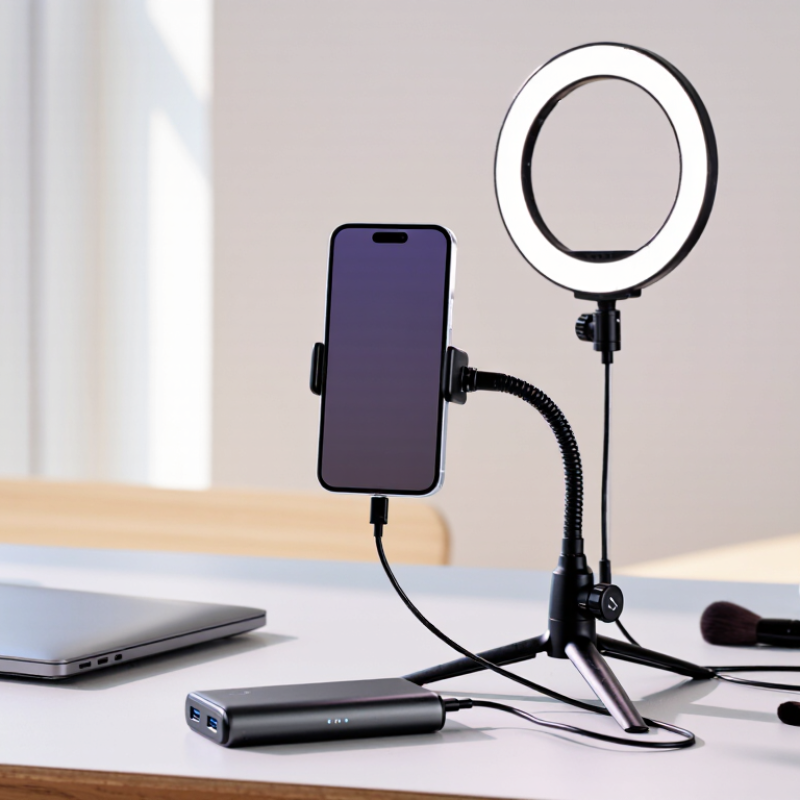
Portable ring lights usually come as clip-on, tabletop, or foldable tripod models. Clip-ons suit quick calls and tight desk spaces, but their small diameter can create sharp shadows. Tabletop lights hold a phone near eye level and work well for makeup or product close-ups. Tripod kits offer more height and distance for full-body framing. Small, but handy. Check the clamp’s grip and the stand’s stability before buying.
Light quality depends on more than size. A dimmer helps balance a bright window; adjustable color temperature can shift from warm indoor tones to cooler daylight. The U.S. Department of Energy’s Energy Saver guidance says LEDs use at least 75% less energy than incandescent lighting. It also says they can last up to 25 times longer. These figures describe LED lighting broadly, not a ring light’s battery runtime. Actual runtime depends on battery capacity, brightness, and temperature. Look for runtime figures at full power, plus charging details and a stated color-rendering index (CRI).
A 10-inch ring may illuminate a face evenly at a desk, while a larger model can spread light across a wider scene. Yet bigger is not always better; it may be awkward to pack and harder to position. Test the light at your usual working distance, with your phone mounted, and check whether reflections appear in glasses or glossy objects. A feature list can’t reveal that part.
| Type | Typical Design | Power and Portability | Best For | Advantages | Things to Consider |
|---|---|---|---|---|---|
| Clip-On Mini Ring Light | Small ring that clips onto a phone, tablet, or laptop screen. | Usually rechargeable or powered through a USB connection; very compact and easy to carry. | Video calls, selfies, and quick close-up content. | Lightweight, quick to attach, and needs little storage space. | Small size provides limited light coverage and may not suit full-body shots or larger spaces. |
| Desktop Ring Light | Ring mounted on a short stand or base, often with a phone holder. | Commonly USB-powered; compact enough for a desk but generally intended for stationary use. | Desk-based streaming, online meetings, and makeup application at a table. | Provides a stable setup and keeps the light close to the subject. | Limited height and reach; check that the base fits your available desk space. |
| Foldable Tripod Ring Light | Ring attached to an adjustable tripod, with a phone mount on many models. | Often folds for transport; may use USB power or a built-in rechargeable battery. | Portrait videos, tutorials, and at-home photography. | Adjustable height and positioning make it more versatile than a clip-on or desktop light. | Tripod stability, folded size, and power-cable length matter when setting up away from a desk. |
| Handheld or Selfie-Stick Ring Light | Compact light integrated with, or attached to, a handheld grip or extendable pole. | Designed for mobility; many models use rechargeable batteries or USB power. | Travel selfies, mobile livestreams, and recording while moving. | Easy to reposition and convenient for phone-based shooting on the go. | Holding the light for long periods can be tiring, and handheld setups may be less steady. |
| Magnetic or Mountable Ring Light | Small light designed to attach to a compatible phone, case, or accessory mount. | Compact and usually battery-powered or rechargeable. | Quick mobile portraits and simple lighting adjustments while traveling. | Fast to attach and remove, with minimal setup and storage needs. | Check device and mount compatibility; magnetic attachment may not work with every phone or case. |
| Foldable Panel-Style Ring Light | Ring or circular light with a collapsible frame or foldable support components. | Folds down for storage; power options vary by model and may include USB or an external adapter. | Creators who need a larger setup that can be packed away between uses. | Offers a compromise between a compact travel light and a more substantial studio-style setup. | Compare packed dimensions, setup time, and the power source before choosing it for frequent travel. |
| Features to Compare | Brightness controls, color-temperature settings, diffusion, phone-holder adjustment, and mounting options. | Look for a power source suited to your location, such as USB power for a desk or a rechargeable battery for mobility. | Any use case where lighting consistency, portability, or accurate positioning is important. | Adjustable brightness and color temperature help adapt the light to the room and subject. | Check the stated battery runtime, charging method, stand stability, compatibility, and included accessories. Runtime and brightness can vary with settings. |
Before choosing a portable ring light, identify where and how you will use it. A desk-based video call has different needs from outdoor portraits or close-up makeup work. Notice the distance between the light and your face, and whether daylight changes during your usual sessions. A small light clipped to a laptop may suit calls, but can leave shadows beneath the eyes. For detail work, adjustable brightness and a stable stand may matter more than maximum output. Keep it practical.
If you film while traveling, check the light’s weight, folded size, charging method, and mount security. A bright light is not automatically better; at close range, it may wash out skin texture or create glare on glasses. Test it nearby. Review the image on camera, not only in a mirror, since a phone’s exposure can change how the light looks. Consider whether you need warm, neutral, or cool tones, and whether the settings stay consistent between sessions. It is easy to overvalue extra features; a simple dimmer can make small adjustments easier. Still, the ideal setting is personal, and a soft glow that works for one person may feel too dim to another.
Brightness is useful only when measured at your working distance. A light rated in lumens may look powerful on paper, yet feel dim when placed far from your face. The IES LM-79-19 method measures total luminous flux and electrical power for solid-state lighting products. When comparing lights, look for measured output, adjustable brightness, and a stated test distance—not wattage alone. Try the light at arm’s length. Check for glare on glasses and harsh shadows beneath your chin.
Color temperature affects how skin and backgrounds appear. A setting near 3200 K gives a warmer indoor look; around 5600 K resembles daylight more closely. Kelvin describes color appearance, not brightness. For color quality, the IES TM-30 method assesses 99 color samples, while traditional CRI Ra uses eight. That difference can matter when clothing or makeup needs to look accurate. Still, a high score cannot guarantee flattering light in every room.
Controls should be easy to adjust without breaking your framing. A dial or clearly spaced buttons help when you need a small brightness change mid-call. Check whether color temperature and brightness can be adjusted independently. Some compact lights offer only a few fixed steps. A caveat: product specifications rarely show how the light looks on different skin tones. If possible, test it in your actual room, with your camera running.
A portable ring light should fit the way you actually work, not just look compact in a product photo. Check its folded size and weight, then imagine carrying it with your phone, cables, and tripod. A light that slips into a small pouch is easier to bring on a commute. But very small models can feel unstable when fully extended. That trade-off is easy to miss.
Look at the power options before buying. A built-in battery keeps the setup tidy, while USB power can be convenient near a laptop or outlet. Check the stated runtime at the brightness you expect to use; maximum brightness may drain a battery much faster. A power bank may help, but confirm the light’s input requirements first. Small detail. Cable placement matters too, especially if it catches on a stand or desk edge.
Check compatibility with your devices and mounting gear. Measure your phone’s width with its case on, and see whether the clamp blocks side buttons or charging ports. If you plan to use a camera, confirm that the light has a suitable mount rather than assuming it will fit. Test the setup at home, including the angle and brightness. Reflections on glasses can be distracting, and a ring light does not fix every lighting problem. I would leave room to adjust.
A portable ring light should feel stable before it looks impressive. Check the frame, clamp, and phone holder for flex, sharp edges, and loose joints. Check the hinge. A weak hinge can sag during a long recording, shifting the light across your face. Look for a diffuser that sits evenly; visible hotspots can make skin tones look harsh. Weight matters too: a sturdy stand is useful at a desk, but awkward to carry between rooms.
Accessories affect daily use more than a crowded product photo suggests. A flexible phone mount, a small tabletop tripod, and a USB cable of practical length can prevent frustrating workarounds. Check whether the light supports adjustable brightness and color temperature, then test the controls with one hand.
The U.S. Department of Energy reports that LEDs use at least 75% less energy than incandescent lighting. That is useful context, not proof of good color rendering; inspect skin tones on camera before buying.
Compare price against construction, control range, and included accessories, not advertised brightness alone. A low-cost kit may suit occasional video calls, while frequent filming can justify a stronger stand and replaceable parts. I would resist paying extra for accessories I already own, though it is easy to overlook the value of a reliable mount. Check return terms, warranty coverage, and whether the advertised power supply is included.
„Thanks to the LUVIR technology, the solder resist process could be switched directly from the previously used mask exposure to direct exposure. As an outstanding digital solution on the market, this technology has been able to demonstrate fast process times and superior quality on our certified conventional ink in production. This allowed us to fully digitize the solder mask process at low cost – without process or ink adjustments. An excellent benefit to our production in Rot am See.“
Ralf Göhringer (Head of Production WE Rot am See)
I would definitely recommend the Limata machine and team for a future company purchase
Michael Greenaway
Compunetics Inc.
“The Limata ldi has been amazing!! Best thing we did was buy this machine”
Richard Brady
GM
Circuitlabs
“Since 2019, we have been running the Limata X1000 LDI system (including LUVIR for solder mask imaging) in daily production as an addition to our current process with film. The machine was capable of properly exposing Taiyo PSR-4000 BN (DI) solder mask types on normal to high-copper boards using a new and unique direct imaging process. The machine operating interface is very user friendly which allowed for a quick technical training curve. The pre-registration processing reduced several seconds of production time at every print. Limata support and service staff is incomparable. They supported our team every step of the way at basically any time of the day or night, with literally, an immediate response time, customizing the software interface to best fit our Operations and needs.
We have exposed more than 8,000 prints since end of October, on various solder mask colors and some resist film panels. Limata, has proven to be very capable and innovative. They are a strong contender in the industry.
We have very much enjoyed this project, and working with the team!
Thank you Limata for the continued support and being a part of our growth.”
Bill Sezate
Vice President, GM
Summit Interconnect
As a replacement to our current contact exposure process with film, the LIMATA X2000 system including LUVIR-Technology was capable of properly exposing non-LDI solder mask types using a direct imaging process. The machine offers cutting edge software with a very intuitive operating interface which allowed for quick technician training curve. The dual drawer system combined with pre-registration processing reduced several seconds of production time at every machine cycle. Limata support and service staff is world class. They added software patches to keep production running at shortest possible response times, customized the software interface to best fit our in-house Operations system, and even wrote a step-by-step machine processing manual. As a result of the project, we have exposed more than 16,000 times on various product types and solder mask brands/colors. Limata, in a very short timeframe as a company, has definitely shown they are truly innovative and will be challenging the industry of direct imaging for the top spot.
Kevin Beattie
Process Engineer
TTM Technologies
Forest Grove Division