Bluetooth Smart Glasses are moving beyond novelty in 2026, but the right pair depends on how you plan to use it. Some models focus on open-ear audio for calls and podcasts, while others add cameras, voice assistants, or navigation features. The difference becomes clear during ordinary moments: hearing a colleague in a noisy café, taking a call on a windy street, or checking directions without reaching for your phone. Small details matter.
This guide compares leading options by practical criteria, including sound quality, microphone performance, battery life, comfort, controls, and phone compatibility. It also considers frame fit and lens choices, since glasses that feel heavy after an hour may be poor companions all day. Published specifications can help, but they do not tell the whole story. A quoted battery estimate, for example, may change with call time, volume, and connected features.
The rankings should be treated as a useful starting point, not a universal verdict. Fit is personal. Where independent testing or clear manufacturer information is available, those details can support a fairer comparison; unclear claims deserve caution. We will also distinguish genuinely useful features from extras that sound impressive but may rarely leave the settings menu. By the end, readers can match a shortlist to their routine, budget, and comfort needs—and spot the compromises worth considering before buying.
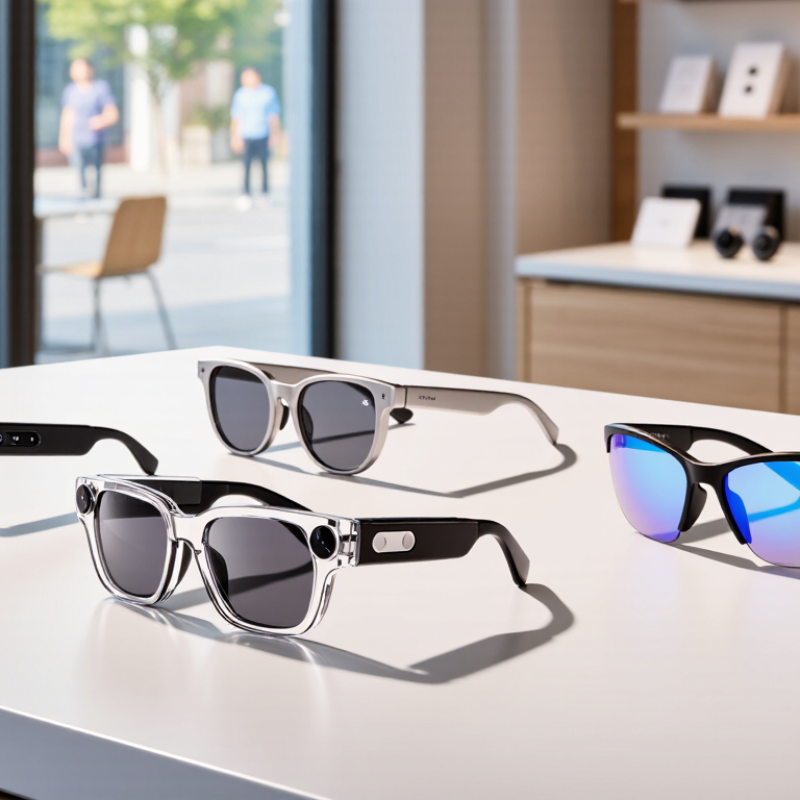
Bluetooth smart glasses combine eyewear with small speakers, microphones, and wireless electronics. Most connect to a phone over Bluetooth, much like wireless earbuds. The glasses receive audio for calls, navigation, or music, while built-in microphones send your voice back. The phone usually handles internet access and demanding voice-assistant tasks; the glasses are mainly the hands-free interface.
A tiny control surface on the frame may let you adjust volume, answer a call, or pause playback. Speakers near the temples often direct sound toward your ears without sealing them. That is the basic loop. Bluetooth range, battery capacity, and frame fit affect daily use. A busy street can also make quiet audio hard to hear, and open speakers may be audible to nearby people. Not quite invisible.
These glasses are not automatically a better choice than earbuds. Their comfort depends on weight, prescription needs, and where the frame rests on your nose. Microphones can pick up wind or surrounding conversation, so call quality varies by setting. Check how recording indicators work and what companion software collects before relying on voice features. The technology can feel convenient, but expectations should stay modest: small frames have limited space for batteries and controls, and some features may work differently across phones.
In 2026, the best Bluetooth smart glasses balance clear audio, dependable connectivity, and comfortable all-day wear. Open-ear speakers should keep voices understandable without blocking nearby sounds. Microphone quality matters too: test a call beside a busy street, not only in a quiet room. Small details matter. Physical buttons can be easier to find than touch controls when walking, while clear volume feedback helps prevent accidental changes.
Battery life depends on speaker volume, call time, and other active features, so published estimates need context. Look for charging details and whether the glasses can handle your usual commute without a midday recharge. Fit deserves equal attention. A frame that presses behind the ears may become tiring, and lens options should suit your vision needs. Check Bluetooth compatibility with your phone and how reliably the glasses reconnect after leaving range. A simple setup is valuable. Still, no specification sheet can fully predict comfort or call quality; a short in-person trial often reveals what the numbers miss. Privacy indicators and straightforward controls also make daily use easier to understand.
When comparing leading Bluetooth smart glasses, start with the tasks you will actually use them for. Open-ear speakers can handle podcasts and short calls, but traffic or busy cafés may mask quiet audio. Check microphone performance, Bluetooth stability, and whether controls are easy to use without looking. Small details matter. A raised button is easier to find than a smooth touch surface when you are walking. Compare battery life using similar settings, since louder volume and frequent calls can shorten a charge.
Tips: Test the fit for at least ten minutes. Check whether the frames slide, press behind your ears, or feel heavy at the temples. If possible, make a call in a quiet room and near ordinary background noise.
Treat advertised specifications as a starting point, not a full verdict. Look for clear information about device compatibility, charging time, replacement parts, and warranty support. Also consider how sound leakage affects people nearby. One feature may look impressive on paper but matter little in daily use. Comfort can be surprisingly personal, and a frame that feels fine in a store may become tiring after an hour. That trade-off is easy to underestimate.
For calls and daily errands, choose Bluetooth smart glasses with clear microphones, simple controls, and a comfortable fit. Check whether callers can hear you beside traffic or a running kitchen fan; quiet-room demos can be misleading. For long listening sessions, compare battery life and open-ear sound. You may hear your surroundings, but bass can feel thin. That trade-off matters.
For workouts, prioritize a secure frame, sweat-resistance information, and buttons you can use with damp hands. For travel or guided tasks, favor reliable pairing and voice controls that work without frequent phone checks. Test the fit with your usual headphones or helmet, if relevant. Small details count. Grand View Research valued the global smart glasses market at about USD 1.93 billion in 2024 and projected 13.3% annual growth through 2030. That estimate covers smart glasses broadly, not Bluetooth-only models, so it signals interest rather than proving which use case will win. Before buying, check independent microphone and battery tests; published specifications rarely capture a windy street or a full workday.
| Use Case | Best-Fit Design | Bluetooth & Audio | Typical Battery Range | Useful Features | Trade-Offs to Consider |
|---|---|---|---|---|---|
| Everyday listening | Lightweight open-ear frames with discreet speakers | Bluetooth 5.x is common; audio is audible to the wearer while leaving the ears open | About 4–8 hours of audio playback, depending on volume and model | Convenient for podcasts, navigation prompts, and casual listening | Open-ear sound can be difficult to hear in noisy places, and people nearby may hear audio at higher volumes |
| Hands-free calls | Frames with multiple microphones and beamforming or noise-reduction processing | Bluetooth calling with built-in microphones and open-ear speakers | Often around 4–7 hours of mixed use; frequent calls can reduce runtime | Useful for short calls while walking or working without holding a phone | Wind, traffic, and crowded environments can affect microphone clarity |
| Outdoor activities | Secure-fitting frames with UV-protective or interchangeable lenses | Wireless audio and phone alerts without covering the ears | Typically about 4–8 hours of audio use; actual runtime varies with volume and temperature | Hands-free directions and ambient awareness; some models offer water-resistance ratings | Check the specific IP rating before exposure to rain or sweat; water resistance does not mean waterproof |
| Travel and navigation | Comfortable everyday frames with clear microphones and voice-assistant support | Bluetooth connection to a phone for spoken directions and notifications | Usually several hours of active audio; standby time is not the same as playback time | Can provide turn-by-turn prompts while keeping the phone accessible in a bag or pocket | Navigation generally depends on a connected phone, its apps, and mobile-data availability |
| Prescription wear | Optical-style frames compatible with prescription lenses or prescription inserts | Bluetooth audio and calling features vary by frame design | Commonly around 4–8 hours of audio playback, depending on the model | Combines vision correction with hands-free audio in one wearable | Confirm lens compatibility, fit, total weight, and replacement-lens options before buying |
| Photo and video capture | Camera-equipped frames with a physical capture control and recording indicator | Bluetooth may handle setup, controls, or notifications; media transfer may also use Wi-Fi | Recording can use more power than audio-only listening; runtime varies widely by resolution and use | Hands-free first-person capture for brief clips and everyday moments | Review local privacy laws and obtain consent where appropriate; check storage, recording limits, and transfer options |
| Notification-focused use | Simple audio-first frames with voice prompts rather than a visual display | Bluetooth connection to a phone for alerts, calls, and assistant access | Often several hours of active use, with longer standby depending on settings | Provides discreet spoken alerts without requiring a screen in the lenses | Frequent notifications can be distracting; app and phone compatibility should be checked |
Battery figures are typical approximate ranges for product categories, not guarantees. Actual performance depends on volume, call or recording time, connectivity, temperature, and battery age. Verify the individual model’s specifications, lens options, and water-resistance rating before purchase.
When comparing Bluetooth smart glasses, start with fit, not the feature list. Check whether the arms press behind your ears or slide when you look down. A few minutes in a shop may not reveal discomfort, so wear them for a longer stretch if possible. Small details count. Consider lens tint, frame weight, and whether the glasses work with your prescription needs. Open-ear speakers can help you stay aware of nearby sounds, but they may leak audio in a quiet room. That trade-off is easy to miss in product descriptions.
Battery life should match your routine, including calls and music, not just standby time. Check how the glasses reconnect after you leave Bluetooth range, and whether their controls are easy to use while walking. Test the microphone with a short voice recording in a mildly noisy place; a quiet-room demo can be misleading. If the glasses include cameras or voice features, review their indicators and privacy settings before use. I may be over-weighting comfort, but a clever feature is little help when the frame pinches. Specifications are useful; they cannot fully predict how a pair will feel on your face.
„Thanks to the LUVIR technology, the solder resist process could be switched directly from the previously used mask exposure to direct exposure. As an outstanding digital solution on the market, this technology has been able to demonstrate fast process times and superior quality on our certified conventional ink in production. This allowed us to fully digitize the solder mask process at low cost – without process or ink adjustments. An excellent benefit to our production in Rot am See.“
Ralf Göhringer (Head of Production WE Rot am See)
I would definitely recommend the Limata machine and team for a future company purchase
Michael Greenaway
Compunetics Inc.
“The Limata ldi has been amazing!! Best thing we did was buy this machine”
Richard Brady
GM
Circuitlabs
“Since 2019, we have been running the Limata X1000 LDI system (including LUVIR for solder mask imaging) in daily production as an addition to our current process with film. The machine was capable of properly exposing Taiyo PSR-4000 BN (DI) solder mask types on normal to high-copper boards using a new and unique direct imaging process. The machine operating interface is very user friendly which allowed for a quick technical training curve. The pre-registration processing reduced several seconds of production time at every print. Limata support and service staff is incomparable. They supported our team every step of the way at basically any time of the day or night, with literally, an immediate response time, customizing the software interface to best fit our Operations and needs.
We have exposed more than 8,000 prints since end of October, on various solder mask colors and some resist film panels. Limata, has proven to be very capable and innovative. They are a strong contender in the industry.
We have very much enjoyed this project, and working with the team!
Thank you Limata for the continued support and being a part of our growth.”
Bill Sezate
Vice President, GM
Summit Interconnect
As a replacement to our current contact exposure process with film, the LIMATA X2000 system including LUVIR-Technology was capable of properly exposing non-LDI solder mask types using a direct imaging process. The machine offers cutting edge software with a very intuitive operating interface which allowed for quick technician training curve. The dual drawer system combined with pre-registration processing reduced several seconds of production time at every machine cycle. Limata support and service staff is world class. They added software patches to keep production running at shortest possible response times, customized the software interface to best fit our in-house Operations system, and even wrote a step-by-step machine processing manual. As a result of the project, we have exposed more than 16,000 times on various product types and solder mask brands/colors. Limata, in a very short timeframe as a company, has definitely shown they are truly innovative and will be challenging the industry of direct imaging for the top spot.
Kevin Beattie
Process Engineer
TTM Technologies
Forest Grove Division